
When an AI agent gives a bad answer, the model usually read your CRM correctly. The CRM was wrong. The evidence on CRM data quality, the five things an agent needs from your CRM, and a two-week cleanup plan before you switch one on.

In this article 7 sections
Every CRM now comes with AI agents. Ask a question in plain English, get an answer. Let the agent update records, draft follow-ups, flag at-risk deals. The demos are impressive, because demos run on clean sample data.
Then you switch it on in your own CRM. The agent tells a rep that an account has no open deals when it has two, under a duplicate company record. It says a deal has gone quiet when the rep emailed yesterday from an inbox that never synced. It summarizes "Stage 3 (old)" as if it meant something.
The model didn't fail. It read your CRM exactly as written. The CRM was wrong. A human rep knows to ignore the duplicate, ask a colleague what "Stage 3 (old)" means, and check their own inbox. An agent can't do any of that. It treats what is in the record as the truth.
The evidence: most CRM data isn't ready
This isn't a hunch. The data-quality numbers are consistent and grim.
- Most CRM data is incomplete or wrong. Validity's State of CRM Data Management in 2025 surveyed 602 CRM users and administrators in the US, UK and Australia. 76% said less than half of their organization's CRM data is accurate and complete, and 45% said their CRM data isn't prepared for AI (SalesTechStar on the Validity report).
- People work around it. The same survey found staff spend an average of 13 hours a week hunting for basic information in the CRM, and 37% admitted to regularly fabricating data to tell leaders what they want to hear.
- AI projects die on it. Gartner predicts that through 2026, organizations will abandon 60% of AI projects unsupported by AI-ready data. In a 2024 Gartner survey, 63% of organizations said they either don't have, or aren't sure they have, the right data management practices for AI (Gartner).
- Sales teams already know. Salesforce's statistics for its 2026 State of Sales report say 74% of sales teams with AI are prioritizing data hygiene to support it, and 84% of data and analytics leaders agree AI's outputs are only as good as its data inputs (Salesforce). That is vendor research, but the direction matches everything else here.
Even clean data is hard for agents
Data quality isn't the only issue. Salesforce AI Research tested leading models on CRMArena-Pro, a benchmark of realistic CRM tasks. The best agents succeeded on about 58% of single-turn tasks and about 35% of multi-turn ones, and showed "near-zero inherent confidentiality awareness" unless told explicitly what not to share (arXiv).
That benchmark used structured, consistent test data. Your production CRM is harder. Every duplicate, blank field and ambiguous stage adds another way for an already imperfect agent to go wrong. Cleaning the data is the part of the problem you control.
The agent reads what is there, not what you meant
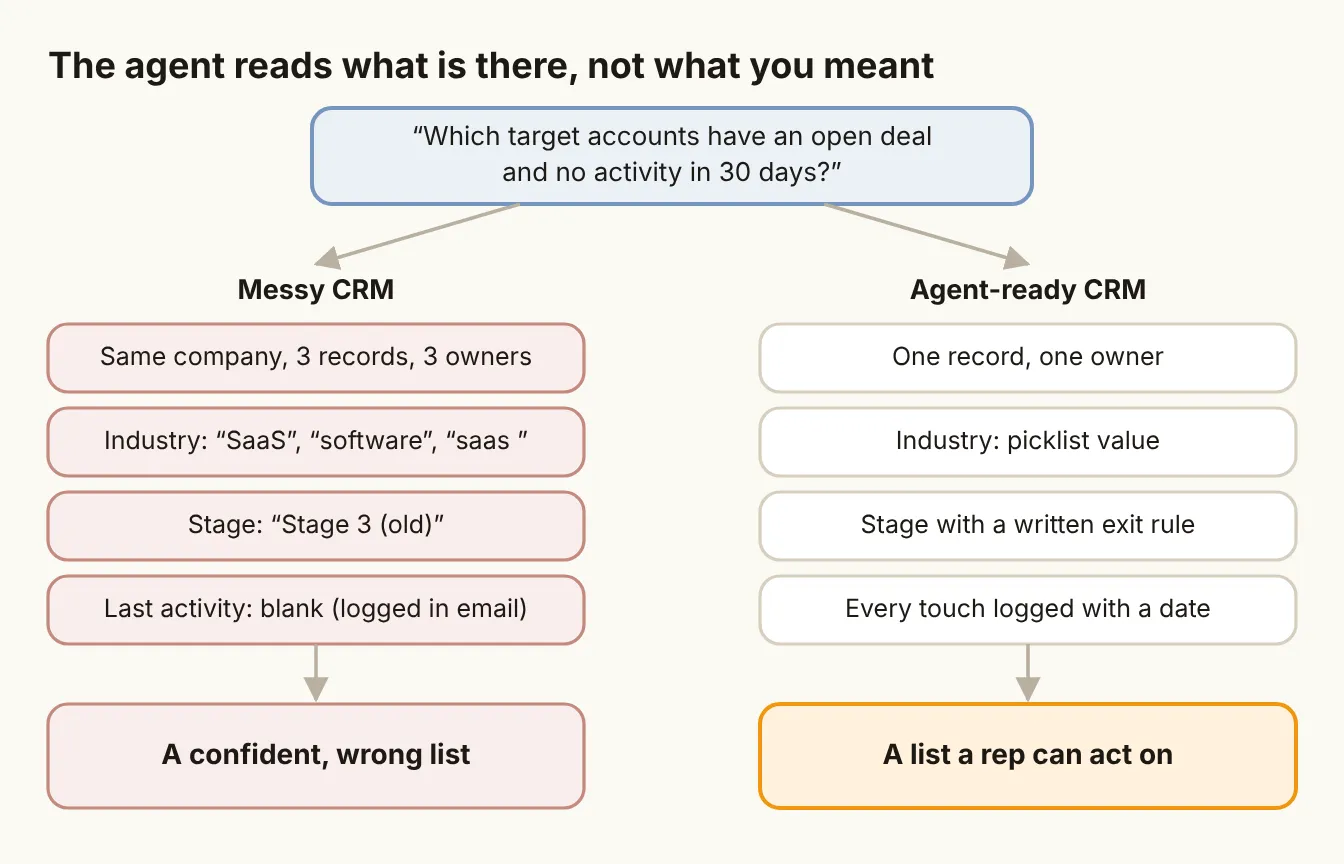
Take a simple question a sales leader might ask an agent: "Which target accounts have an open deal and no activity in 30 days?" To answer it, the agent has to:
- Find target accounts. That needs a reliable field marking an account as a target, not a free-text note.
- Match each account to its deals. That needs one company record, not three duplicates with deals scattered across them.
- Know which deals are open. That needs stages with clear meanings, and none that are left over from an old pipeline.
- Find the last activity. That needs every email, call and meeting logged with a date, including the ones sent from a rep's own inbox.
Miss any one of these and the agent still returns a list. It just returns the wrong one, confidently and in perfect English. That is worse than no answer, because it looks right.
Five things an agent needs from your CRM
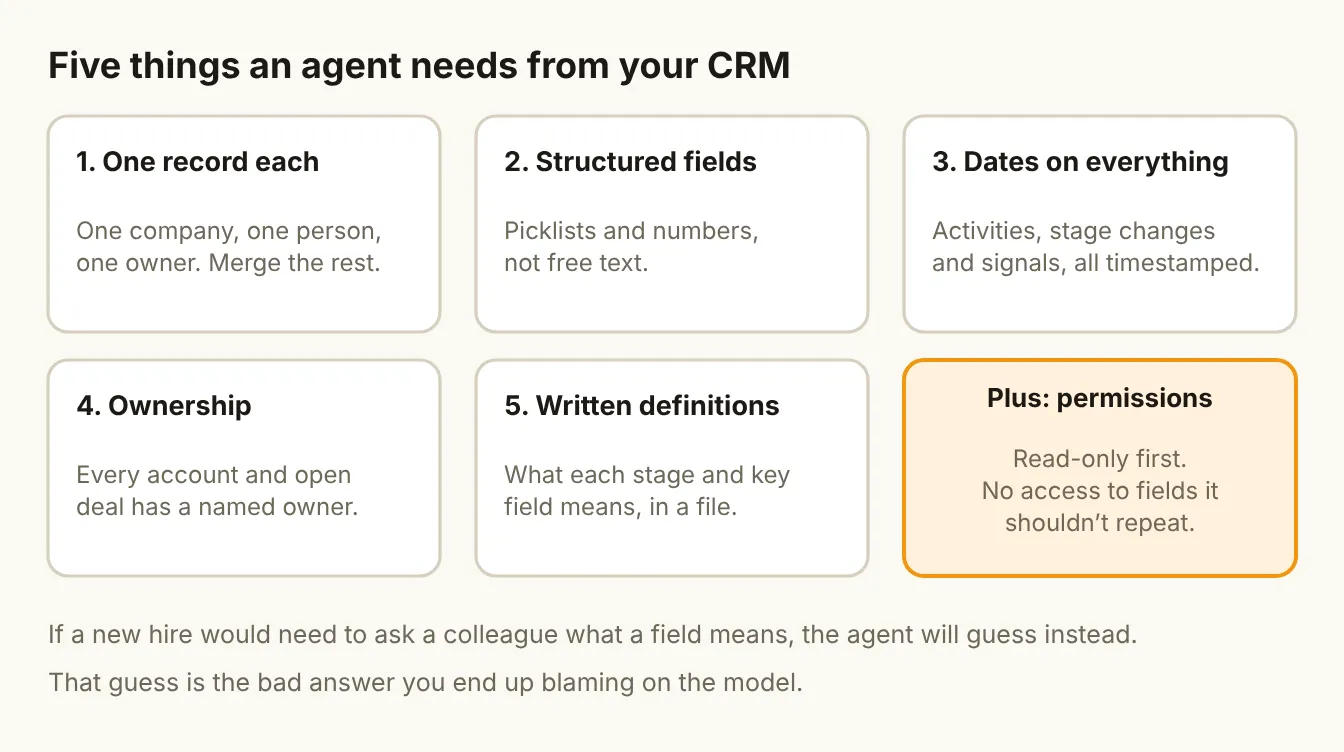
1. One record per company and person
Duplicates are the most common and most damaging problem. An agent can't know that "Example Inc", "Example" and "example.io" are the same company unless you have merged them. Pick a matching key (company domain works for most B2B teams), merge the duplicates, and turn on duplicate checks for new records.
2. Structured fields, not free text
Agents handle structured values far more reliably than prose. "Industry: SaaS" from a picklist is usable. "SaaS", "software", "Saas " and "B2B software co" typed by four different reps are four different industries. Convert the fields that drive decisions (industry, segment, lead source, loss reason, deal type) into picklists, and make the critical ones required.
3. Dates on everything
An agent can't judge freshness without dates. Every activity, stage change and signal needs a timestamp. In practice, the biggest gap is activity: emails and meetings that happen in a rep's inbox or calendar but never sync to the CRM. Turn on inbox and calendar sync, and check that it is actually logging.
4. An owner on every record
"Who owns this account?" is one of the first things an agent gets asked, and one of the most common blanks. Every account and every open deal should have exactly one named owner. Reassign records from people who have left.
5. Written definitions
What does each deal stage mean, and what has to be true to move to the next one? What counts as a "target account"? What is the difference between "closed-lost" and "disqualified"? Write it down in one file, keep it current, and give it to the agent as context. The definitions you would explain to a new hire on day one are exactly what an agent needs on every run.
Plus: permissions
Agents have "near-zero inherent confidentiality awareness," according to the CRMArena-Pro research above. So decide what the agent can see and do before it starts:
- Start read-only. Let it answer questions and suggest updates before it can make them.
- Hide what it shouldn't repeat. Compensation, personal notes, legal and HR fields should be out of its reach.
- Grant write access one action at a time, once its suggestions have proved accurate.
A two-week cleanup before you switch an agent on
You don't need a six-month data project. You need two focused weeks on the fields the agent will actually use.
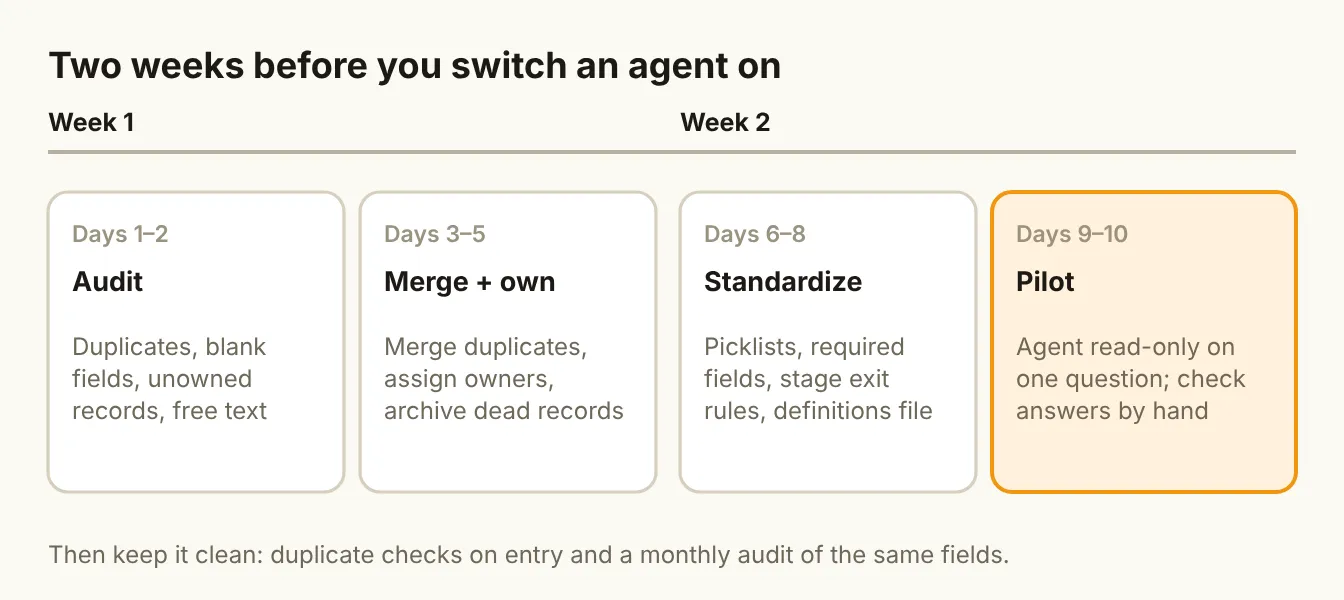
Days 1 to 2: Audit. Pick the first question you want an agent to answer. List every field it depends on. For each, measure the share of records that are blank, duplicated or free text.
Days 3 to 5: Merge and own. Merge duplicate companies and contacts. Assign an owner to every account and open deal. Archive records that are clearly dead.
Days 6 to 8: Standardize. Convert key fields to picklists, make them required, write exit criteria for each deal stage, and put your definitions in one file.
Days 9 to 10: Pilot. Turn the agent on, read-only, for that one question. Check its answers against the records by hand. Every wrong answer points at a data problem you missed.
Then keep it clean: duplicate prevention on entry, required fields on the forms reps actually use, and a monthly check of the same audit numbers. Data quality isn't a project you finish. It is a habit you either have or don't.
Where the tools fit
Your CRM's built-in agent is a reasonable place to start, because it already understands the data model. In HubSpot, Salesforce or Attio, the same rules apply: the agent is only as good as the records behind it.
If your best data lives outside the CRM, in a warehouse or product database, a reverse-ETL tool such as Hightouch can sync clean, modeled fields into the CRM, so the agent reads one consistent version instead of several conflicting ones. And if you build your own agents or workflows, the definitions file from step 5 belongs in the same version-controlled context as your ICP and scoring rules, as described in Signal Over Volume.
The bottom line
When an agent gives a bad answer, look at the record before you blame the model. Most of the time the agent did exactly what it was asked, with exactly the data it was given. Merge your duplicates, structure the fields that matter, date every touch, give every record an owner and write your definitions down. Do that, and the agent becomes useful. Skip it, and you have bought a fast, fluent way to repeat your CRM's mistakes.
Sources
- SalesTechStar on Validity's State of CRM Data Management in 2025 (Jul 2025)
- Validity: The State of CRM Data Management in 2025
- Gartner: Lack of AI-ready data puts AI projects at risk (Feb 2025)
- Salesforce: Sales statistics from the State of Sales report (Feb 2026)
- Salesforce AI Research: CRMArena-Pro (arXiv, May 2025)