
Inbox providers moved from guidelines to enforcement: Outlook rejects unauthenticated high-volume mail, and Gmail has ramped up rejections since November 2025. The exact thresholds, the bounce codes that tell you you've been caught, and a 15-minute weekly review.

In this article 10 sections
- What changed: guidelines became rejections
- The thresholds, in one table
- The detail most cold emailers miss: bulk status is permanent
- Spam rate: where to live
- The bounce codes that tell you you've been caught
- Benchmarks without the hype
- The 15-minute weekly deliverability review
- The setup checklist, for reference
- The bottom line
- Sources
For years, email deliverability advice came with a soft edge. Authenticate your domains, keep complaints low, make it easy to unsubscribe, and the inbox providers would probably treat you well. Ignore it, and you would probably land in spam more often.
That era is over. The big inbox providers now enforce their rules by rejecting mail outright. Outlook started bouncing unauthenticated high-volume mail in May 2025. Gmail began "ramping up its enforcement on non-compliant traffic" in November 2025, with temporary and permanent rejections. If your cold email setup was built on the old, forgiving assumptions, Q4 volume is when you will find out.
The cold outbound stack covers how to set up sending infrastructure. This article goes deeper on the rules themselves: the exact thresholds, what changed, the bounce codes that tell you you have been caught, and a weekly routine that keeps you clear of all of it.
What changed: guidelines became rejections
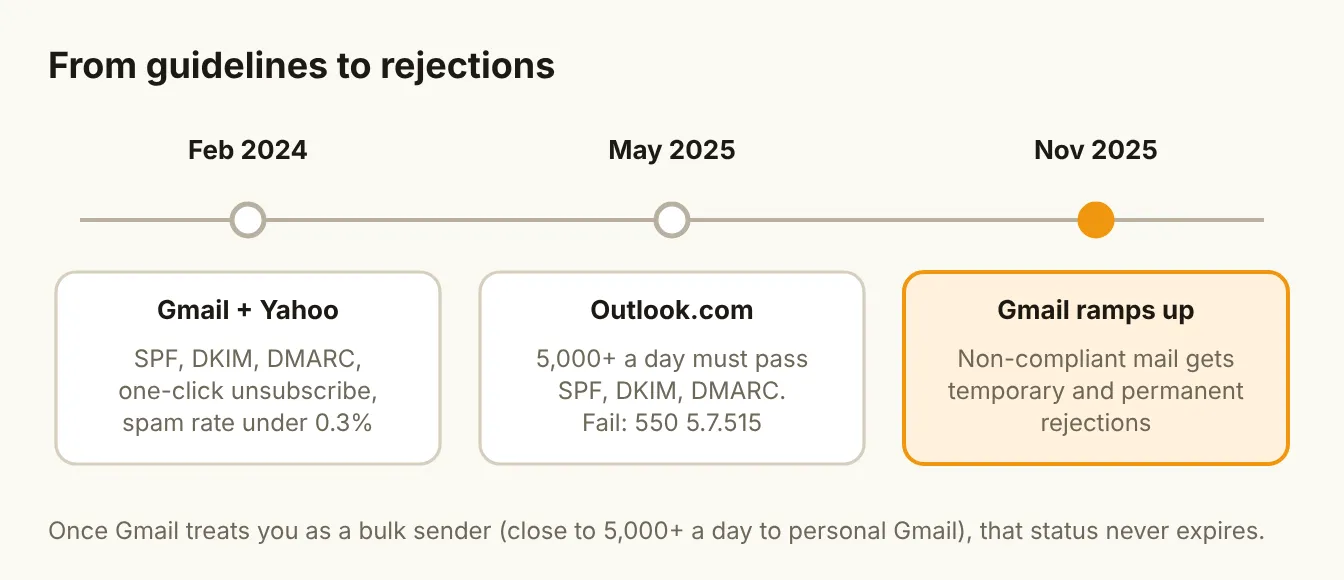
February 2024: Gmail and Yahoo. Google's sender guidelines took effect for anyone sending more than 5,000 messages a day to personal Gmail accounts: SPF and DKIM, a DMARC record (a policy of "none" is enough), alignment between the visible From domain and SPF or DKIM, valid forward and reverse DNS, TLS, properly formatted messages, and one-click unsubscribe for marketing mail (Google). Yahoo set matching rules from the same month: SPF and DKIM, a passing DMARC policy of at least "none", one-click unsubscribe and a spam rate below 0.3% (Yahoo Sender Hub).
May 2025: Outlook. Microsoft began requiring domains that send more than 5,000 messages a day to Outlook.com, Hotmail.com and Live.com addresses to pass SPF, DKIM and DMARC. Mail that doesn't is rejected with the error 550 5.7.515 (Microsoft Tech Community; Suped's summary of the requirements).
November 2025: Gmail ramps up. Google added a notice to its bulk sender FAQ: "Starting November 2025, Gmail is ramping up its enforcement on non-compliant traffic." Messages that fail the requirements "will experience disruptions," including temporary and permanent rejections (Google). As one long-time deliverability writer put it, the rules didn't change; enforcement simply became more consistent (Spam Resource).
The thresholds, in one table
| Requirement | Gmail | Yahoo | Outlook.com |
|---|---|---|---|
| Applies to | Close to 5,000+ messages a day to personal Gmail | Bulk senders | 5,000+ messages a day |
| SPF and DKIM | Both required | Both required | Both required |
| DMARC | Required, p=none is enough | Required, at least p=none | Required, at least p=none |
| Alignment | From domain aligns with SPF or DKIM | DMARC must pass | DMARC must pass |
| Unsubscribe | One-click, required for marketing mail | One-click, required for marketing mail | A clear, working unsubscribe link is expected |
| Spam rate | Below 0.3%, target below 0.1% | Below 0.3% | No published threshold |
| What failure looks like | Deferrals (4xx) and rejections (5xx) | Gradual enforcement | 550 5.7.515 rejection |
Sources: Google sender guidelines, Google bulk sender FAQ, Yahoo Sender Hub, Microsoft Tech Community.
The detail most cold emailers miss: bulk status is permanent
Google defines a bulk sender as anyone sending "close to 5,000 messages or more to personal Gmail accounts" in a day, counted across messages from the same primary domain. And once you cross that line, "bulk sender status doesn't have an expiration date." Cutting your volume later doesn't remove it (Google).
Two consequences for cold outbound:
- Volume is counted by domain, not by inbox. Spreading sends across ten inboxes on one domain doesn't keep you under the line. The domain is the unit.
- One bad month follows you. A domain that crossed the threshold during a big push stays a bulk sender. Treat every sending domain as if the full rules apply, from day one.
This is one more reason the standard advice holds: never send cold email from your main domain, and treat each sending domain as something you are responsible for, not a disposable asset.
Spam rate: where to live
The number Google watches most closely is the spam rate shown in Postmaster Tools: the share of your mail that recipients mark as spam. The requirement is below 0.30%. Google's own recommendation goes further: "Keep spam rates reported in Postmaster Tools below 0.10% and avoid ever reaching a spam rate of 0.30% or higher" (Google).
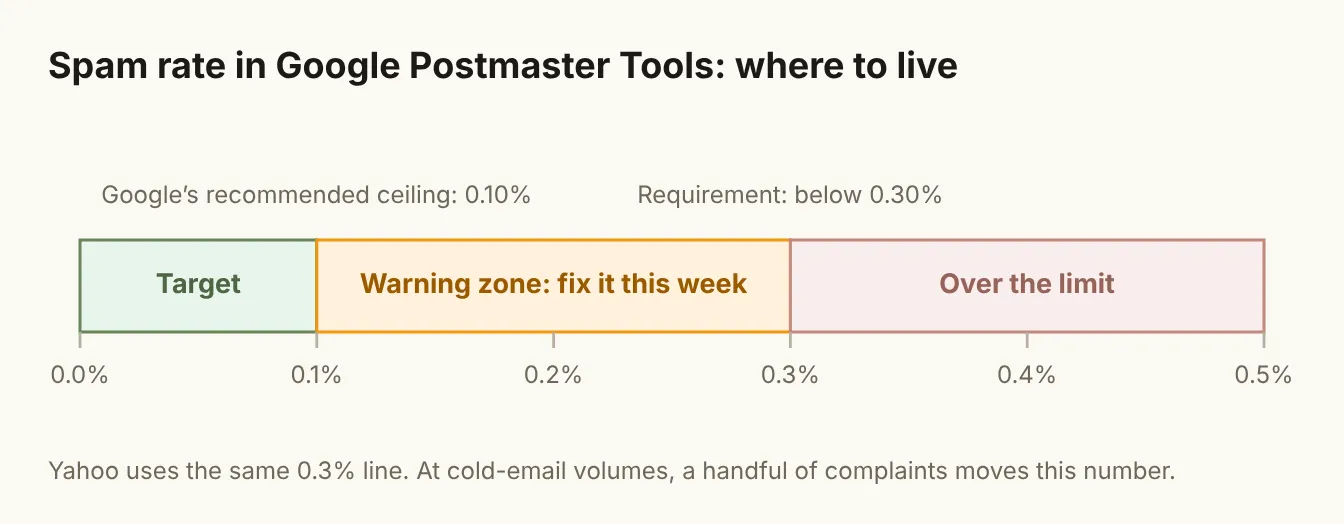
At cold email volumes, that is a very small number. On a domain sending 1,000 emails a day, 0.3% is three complaints. A single poorly targeted campaign can get there by lunchtime.
What actually keeps the rate down is upstream of the inbox:
- Tight targeting. Mail sent to people with a dated reason to hear from you gets fewer complaints than mail sent to a list. This is the whole argument of Signal Over Volume.
- An easy way out. A visible, plain-text "not interested? reply 'no' and I won't follow up" line costs you nothing and turns a would-be spam click into a reply.
- Short sequences. Most replies come early. Instantly's 2026 benchmark says 58% of replies arrive on the first email (Instantly). Every extra follow-up to a silent prospect adds complaint risk for a shrinking return.
The bounce codes that tell you you've been caught
Your sequencer reports bounces, but most teams only look at the bounce rate. The codes tell you why, and the why decides what to fix.
| What you see | What it usually means | What to do |
|---|---|---|
| 550 5.7.515 from Outlook | Your domain failed Microsoft's authentication requirement | Check SPF, DKIM and DMARC for that domain today |
| 4xx deferrals from Gmail | Temporary: Gmail is slowing or testing your mail | Cut volume on that domain and check Postmaster Tools |
| 5xx rejections from Gmail | Permanent: the message didn't meet requirements | Stop sending from that domain until you find the cause |
| "User unknown" or "mailbox not found" | Bad addresses: a list problem, not a reputation one | Re-verify the list and check which data source it came from |
A spike in bad-address bounces points at your data layer. A spike in policy rejections points at your setup or your reputation. They need different fixes, so look at the codes, not just the total.
Benchmarks without the hype
Cold email benchmarks are everywhere, and they disagree wildly. That is worth knowing before you judge your own numbers against someone else's chart.
- Instantly's 2026 benchmark puts the average cold reply rate at 3.43%, with the top quartile at 5.5% and elite campaigns above 10%. It doesn't state a sample size (Instantly).
- A roundup of 2026 benchmarks lists Saleshandy at 3.7% across 53 million emails and Belkins at 0.45% across 7.5 million emails, excluding auto-replies (lemlist).
That is nearly an eightfold gap between published averages, mostly down to different definitions, audiences and data sets. Most of these numbers also come from vendors who sell sending tools.
Use benchmarks to sanity-check, not to set targets. Your own baseline, measured the same way every week, is the only number that tells you whether a change helped.
The 15-minute weekly deliverability review
Deliverability problems are cheap to fix early and expensive to fix late. A short weekly review catches most of them before they cost you a domain.
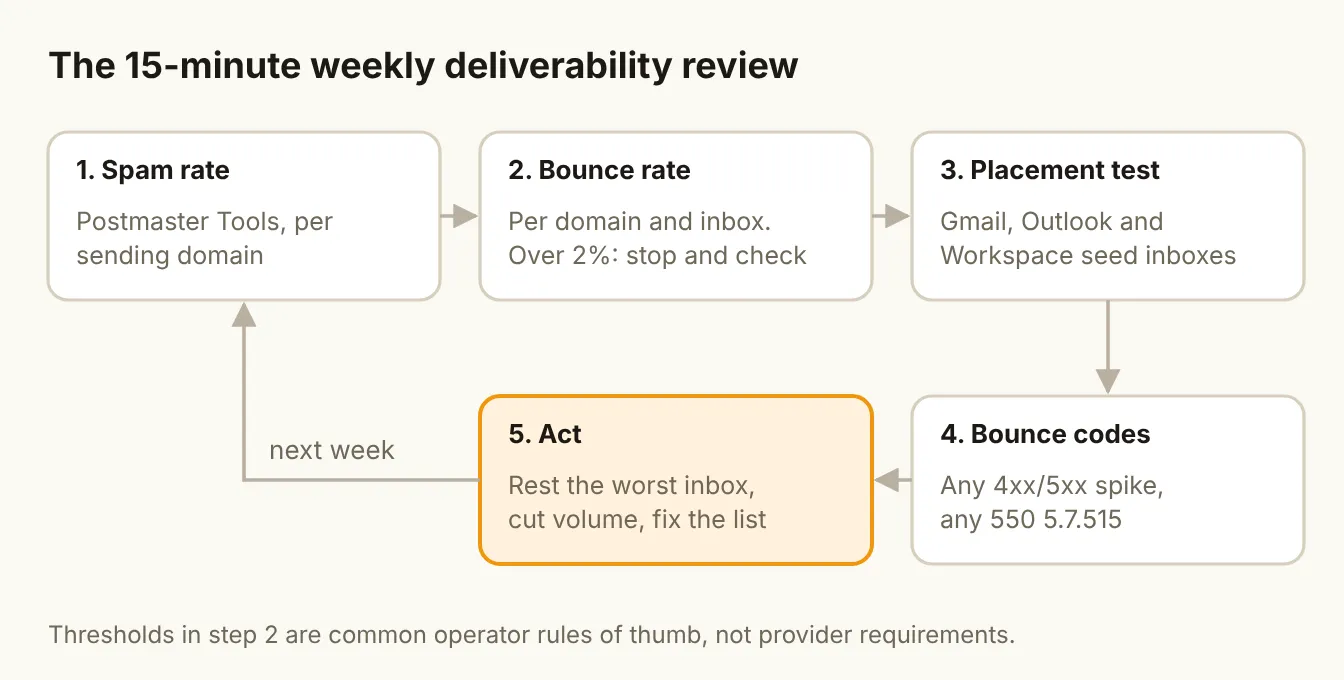
- Spam rate. Open Google Postmaster Tools for each sending domain. Anything above 0.1% gets investigated this week.
- Bounce rate. Check per domain and per inbox in your sequencer. A common rule of thumb is to keep bounces under 2% and to pause anything well above that (Instantly).
- Placement test. Send a test to seed inboxes across Gmail, Outlook and Google Workspace and see where it lands. MailReach and similar tools automate this.
- Bounce codes. Scan for any spike in 4xx or 5xx codes, and any 550 5.7.515 at all.
- Act. Rest the worst inbox, cut volume on the weakest domain, and fix the list or the targeting behind any complaints.
Put the results on one shared sheet. Over a quarter, you will see which domains, lists and campaigns cause trouble, and that pattern is worth more than any single week's numbers.
The setup checklist, for reference
If you are setting up a new sending domain, or auditing an old one, this is the minimum:
- Separate sending domains, never your main domain
- SPF and DKIM set up and passing for every sending domain
- DMARC published (start at p=none) and passing, with the From domain aligned
- Valid forward and reverse DNS for your sending infrastructure
- One-click unsubscribe headers, plus a plain-language opt-out line in the email
- Inboxes warmed up for a few weeks before real campaigns
- Conservative daily caps per inbox. Google Workspace allows 2,000 messages a day per user (Google Workspace), but cold email should run far below that
- Every address verified before it is sent to
- Postmaster Tools set up for every sending domain
- A named owner for the weekly review
Smartlead and Instantly handle multi-inbox sending, warmup and rotation, which covers several of these in one place.
The bottom line
The inbox providers have stopped asking nicely. Authentication, low complaints and easy unsubscribes are now the price of entry, and the penalty for missing them is a rejected message, not just a spam folder. Treat deliverability as a weekly KPI with an owner, keep your spam rate closer to 0.1% than 0.3%, and send fewer, better-targeted emails. The teams that do will keep their domains. The ones that don't will keep buying new ones.
Sources
- Google: Email sender guidelines
- Google: Bulk sender FAQ
- Spam Resource: Google warns sender requirements enforcement ramping up (Nov 2025)
- Yahoo Sender Hub: Best practices
- Microsoft Tech Community: Outlook's new requirements for high-volume senders
- Suped: Microsoft's sender requirements explained
- Google Workspace: Gmail sending limits
- Instantly: Email sequence benchmarks 2026
- lemlist: Cold email benchmarks 2026