
Visitor identification tools can name the companies, and sometimes the people, reading your site. Treat every name as a lead and you spam your best accounts. Score the visit, route only the strong ones, and let the rest wait for a second signal.

In this article 9 sections
- What visitor identification can and can't tell you
- Why “they visited, so email them” backfires
- Step 1: score the visit, not the visitor
- Step 2: route by tier, not by name
- Step 3: write outreach that never mentions the visit
- Step 4: wire it up without drowning the team
- Privacy: know where your traffic comes from
- The bottom line
- Sources
Most of the people who read your pricing page never fill in a form. They look, they leave, and they talk to the vendor who reached them first. Website visitor identification promises to fix that: install a script, and the companies (and sometimes the people) behind anonymous visits show up in Slack or your CRM.
The tools work. What usually breaks is what happens next. A team turns on visitor ID, pipes every name into a sequence, and within a month their best target accounts are getting "saw you were on our site" emails about a careers page visit. Reply rates drop, a prospect forwards one to their security team, and the channel gets switched off.
Visitor ID is a signal, not a lead list. This is how to treat it like one.
What visitor identification can and can't tell you
There are two kinds of identification, and they are very different products.
- Company-level tools match the visitor's IP address to the organization behind it. They tell you Acme Corp was on your site, not who at Acme. Accuracy is best for office networks and large companies, and weaker for remote workers on home broadband and mobile.
- Person-level tools try to name the individual, usually by matching browser and device signals against an identity graph. RB2B and Warmly are the best-known examples. Person-level matching is mostly limited to US traffic; outside the US, expect company-level results at best.
Treat every published match rate with suspicion. Figures for the same tool range from single digits to well over 40%, and as one vendor's own analysis points out, the claims rarely say what they are measured against: all sessions, engaged sessions, or US sessions only (Knock2). That article comes from a competitor, but its advice is sound: test on your own traffic, and divide identified visitors by engaged sessions (10+ seconds or two or more pages), not raw pageviews.
The free option that many teams relied on is also gone. Clearbit, now part of HubSpot, retired its free Weekly Visitor Report and other free tools on April 30, 2025, pointing users to HubSpot's Breeze Intelligence instead (Clearbit changelog). If your visitor data quietly stopped arriving last year, that's probably why.
Why “they visited, so email them” backfires
A visit tells you someone was there. It does not tell you why. The same pricing page is read by buyers, competitors, analysts, job seekers, students and your own investors. A single blog visit from a target account is far more likely to be a researcher than a buying committee.
Buyers are also quick to punish outreach that misses. In Gartner's survey of 632 B2B buyers, 73% said they actively avoid suppliers who send irrelevant outreach, and 61% said they prefer a rep-free buying experience overall (Gartner). An email that opens with "I noticed you visited our website" is irrelevant by definition when the visit was a careers page. It's also a little unnerving, which is the opposite of what a first touch should do.
None of this means the data is useless. It means the visit needs to be scored and filtered before anyone acts on it.
Step 1: score the visit, not the visitor
Not all pages are equal, and neither are all patterns. Give each visit a weight based on what was read and how:
| Signal | Weight | Why |
|---|---|---|
| Pricing, plans or "compare" pages | High | Buyers read these when cost is on the table |
| Integration or security pages | High | Late-stage questions from someone checking fit |
| Repeat visits in 7 days | High | One visit is curiosity; three is research |
| Two or more people from the same company | High | A buying group, not one person browsing |
| Case studies, product pages | Medium | Interest, but often early |
| Blog posts, guides | Low | Research and education, rarely buying |
| Careers, about, press | Ignore | Job seekers, journalists, investors |
Then filter by fit before anything else. A strong visit from an account outside your ICP is still outside your ICP. If you already split lead scores into fit and engagement (as we covered in why reps ignore lead scores), a scored visit is just another engagement event, with the same decay rules.
Step 2: route by tier, not by name
Once each visit has a weight, the action follows from the tier. Only the strongest tier should reach a rep the same day.
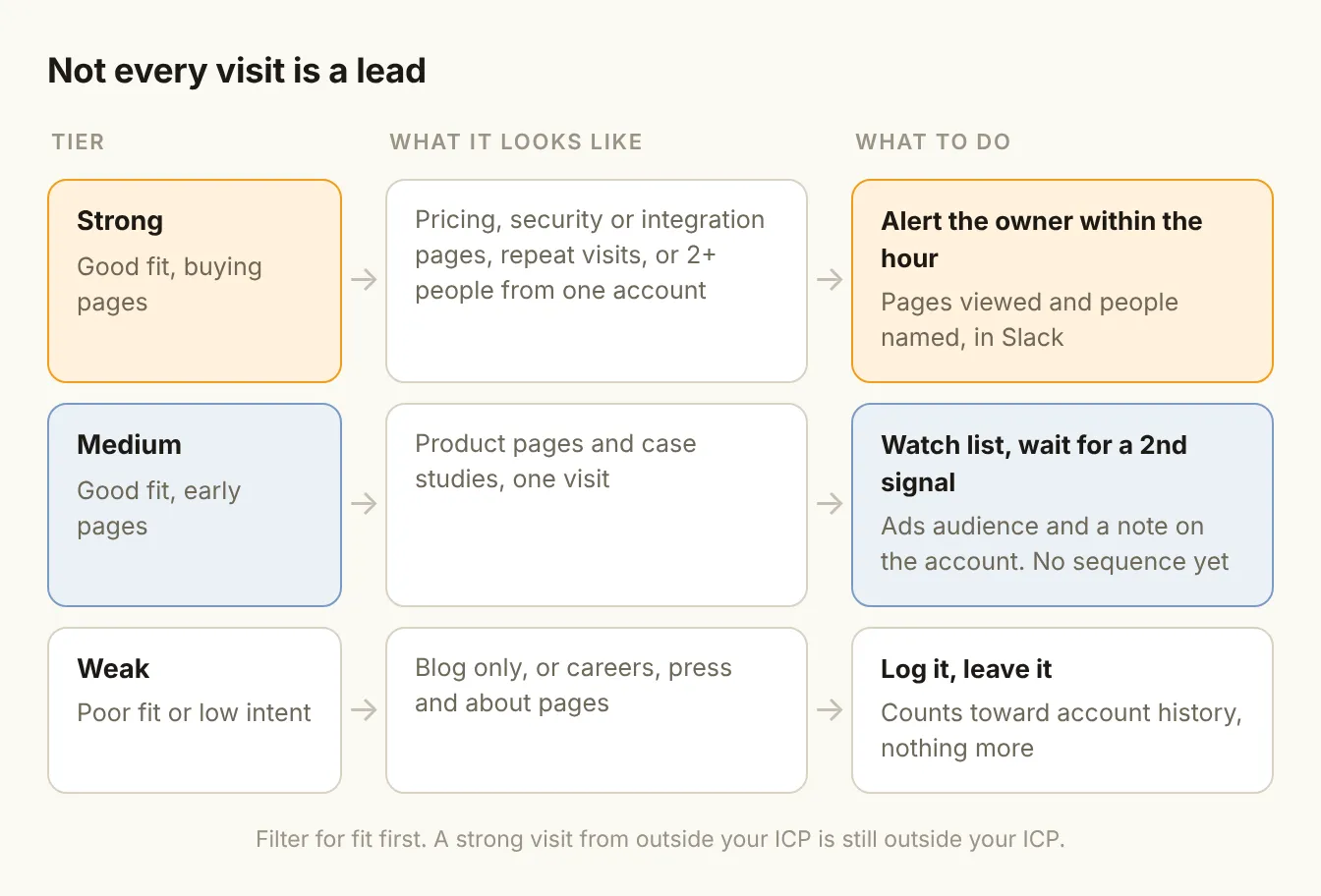
- Strong (high fit, high-weight pages or a group visit): alert the account owner in Slack within the hour, with the pages viewed and the people identified. The HBR audit of web lead response is old, but its lesson holds: firms that responded within an hour were nearly seven times as likely to qualify a lead as those that waited longer (HBR).
- Medium (good fit, early-stage pages): add the account to a watch list and to retargeting ads, and note it on the account record. Don't sequence anyone yet. Wait for a second signal.
- Weak (poor fit, or low-weight pages only): log it and leave it. It still counts toward an account's engagement history.
The second-signal rule is the one that saves your reputation. A medium visit plus a new VP of Sales hired last month, a funding round, or a reply to an earlier campaign is a real reason to reach out. A medium visit alone isn't.
Step 3: write outreach that never mentions the visit
The fastest way to waste a good signal is to quote it back to the buyer. "I saw you were looking at our pricing page" tells them they're being watched and gives them nothing in return.
Use the visit to choose the topic, not the opening line:
- Someone read the Salesforce integration page? Lead with how teams on Salesforce typically set it up, and offer the one-page integration guide.
- Two people from the same company read security and SSO pages? Send the security pack to the account owner's champion, framed as "teams at your stage usually ask about this next".
- Someone compared you to a named competitor? Send an honest comparison, not a pitch.
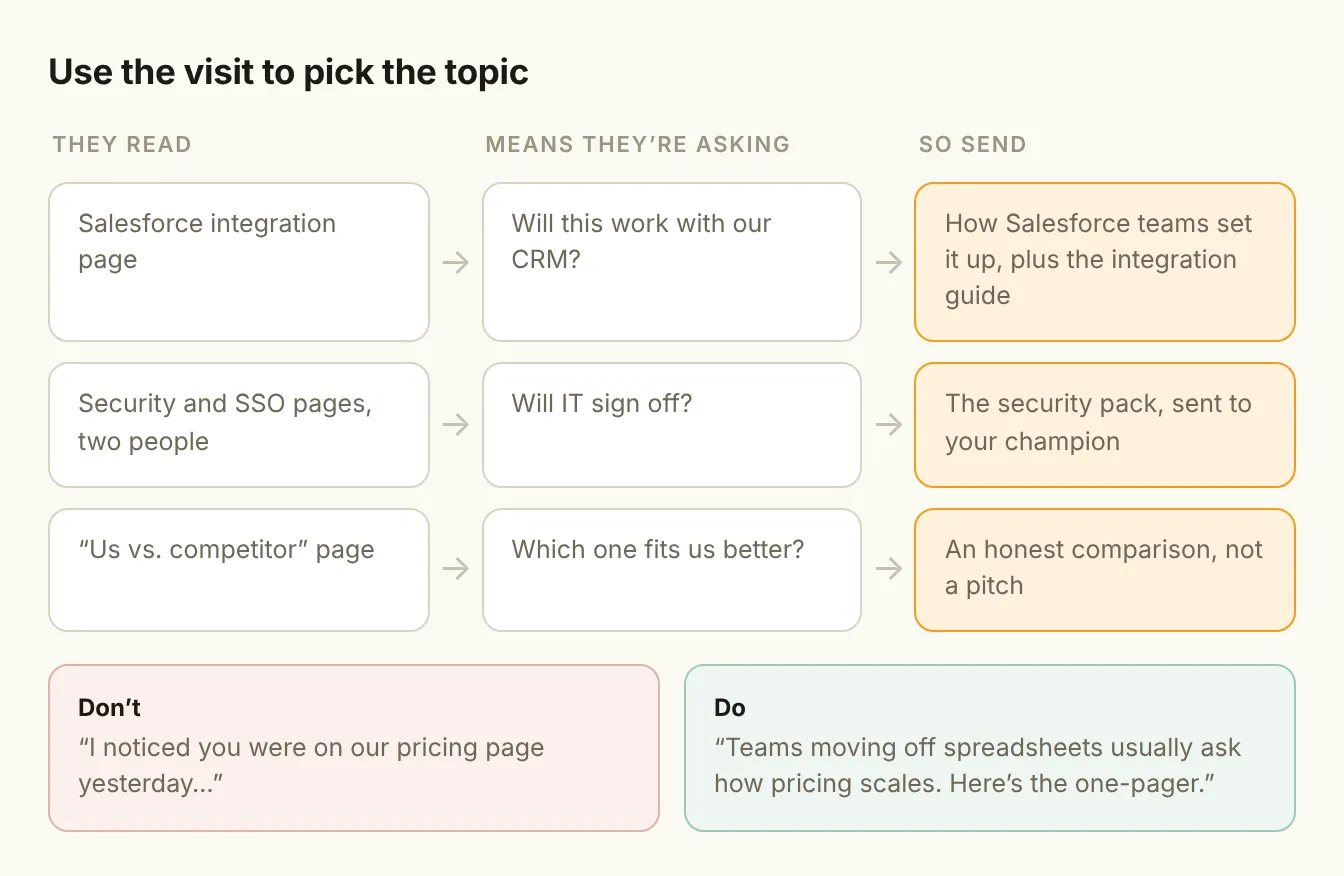
If the outreach would make sense without the visit, the visit did its job. If it only makes sense because you mention the visit, rewrite it.
Step 4: wire it up without drowning the team
A workable setup has four parts, and none of them needs to be expensive.
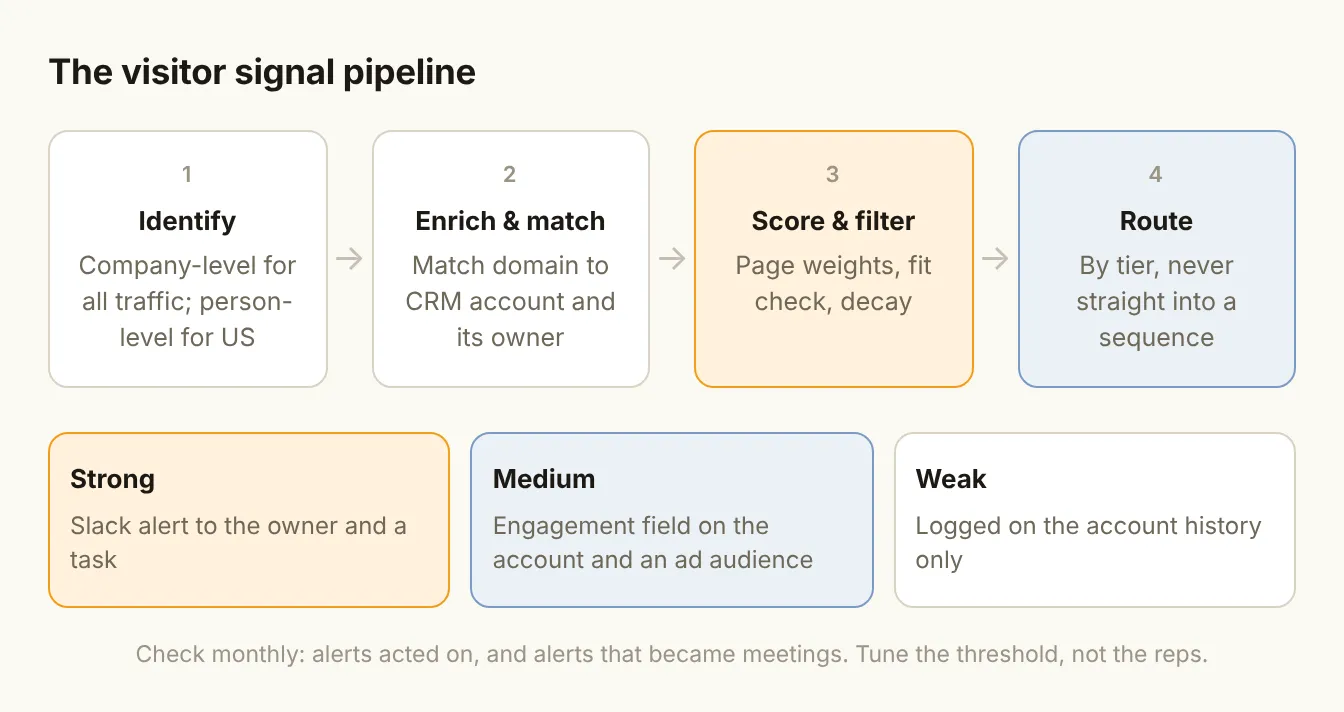
- Identify. One company-level source for all traffic, plus person-level for US traffic if your market is mainly American.
- Enrich and match. Match identified companies to accounts already in your CRM, and attach the account owner. In Clay or HubSpot, this is a lookup on domain. Unmatched companies that fit your ICP become new accounts; the rest are dropped.
- Score. Apply the page weights and the fit filter from Step 1. Add decay so that last quarter's visits stop counting.
- Route. Strong visits go to the owner's Slack channel and create a task. Medium visits update a "website engagement" field and an ad audience. Nothing is added to a sequence automatically.
Then watch two numbers each month: how many strong alerts reps actually acted on, and how many of those turned into meetings. If reps ignore most alerts, your threshold is too low. If the alerts convert well but there are only a handful, try lowering it a notch.
Privacy: know where your traffic comes from
Company-level identification works with business data that is generally lower risk. Person-level identification processes personal data, and the rules depend on where the visitor is.
- US traffic: person-level identification is widely used, but state privacy laws are tightening. Disclose it in your privacy policy and honor opt-outs.
- UK and EU traffic: you need a lawful basis. If you rely on legitimate interests, the UK regulator expects you to pass a three-part test (purpose, necessity and balancing) and to record it (ICO). Cookie and tracking rules also apply separately. Most person-level tools don't operate on EU and UK traffic for this reason.
This isn't legal advice. If a meaningful share of your traffic is from Europe, get your privacy counsel to review the setup before you turn person-level identification on.
The bottom line
Visitor identification is one of the most useful signals a GTM team can add, and one of the easiest to ruin. A visit is not a hand-raise. Score what was read, filter for fit, interrupt a rep only for the strongest tier, wait for a second signal on the rest, and never quote the visit back to the buyer. Do that, and the people reading your pricing page start hearing from you at the right moment, about the right thing.