
A layer-by-layer blueprint for cold outbound that still works in 2026: signals, waterfall enrichment, agent-assisted drafting, sending infrastructure and the feedback loop that ties them together.

In this article 8 sections
- The five jobs every outbound stack has to do
- Layer 1: Signals decide who, and when
- Layer 2: Data finds the right people and verifies them
- Layer 3: Orchestration turns a signal into a message
- Layer 4: Sending protects the domain
- Layer 5: The CRM closes the loop
- A starting stack for each stage
- Your 30-day rebuild plan
Most outbound stacks are not designed. They accumulate. A data tool gets bought for one campaign, a sequencer for another, a "signals" add-on because a competitor had it, and a year later nobody can say which line item actually books meetings.
Meanwhile the ground has moved. Inbox providers enforce sender rules that punish careless volume, buyers do more research before they ever reply, and AI has made generic outreach cheap enough that everyone sends it. A stack built for "more sends" now quietly burns domains and reputation.
This is the blueprint I would use to rebuild cold outbound from zero in 2026. It is organised by job, not by tool, because tools change every year and the jobs don't.
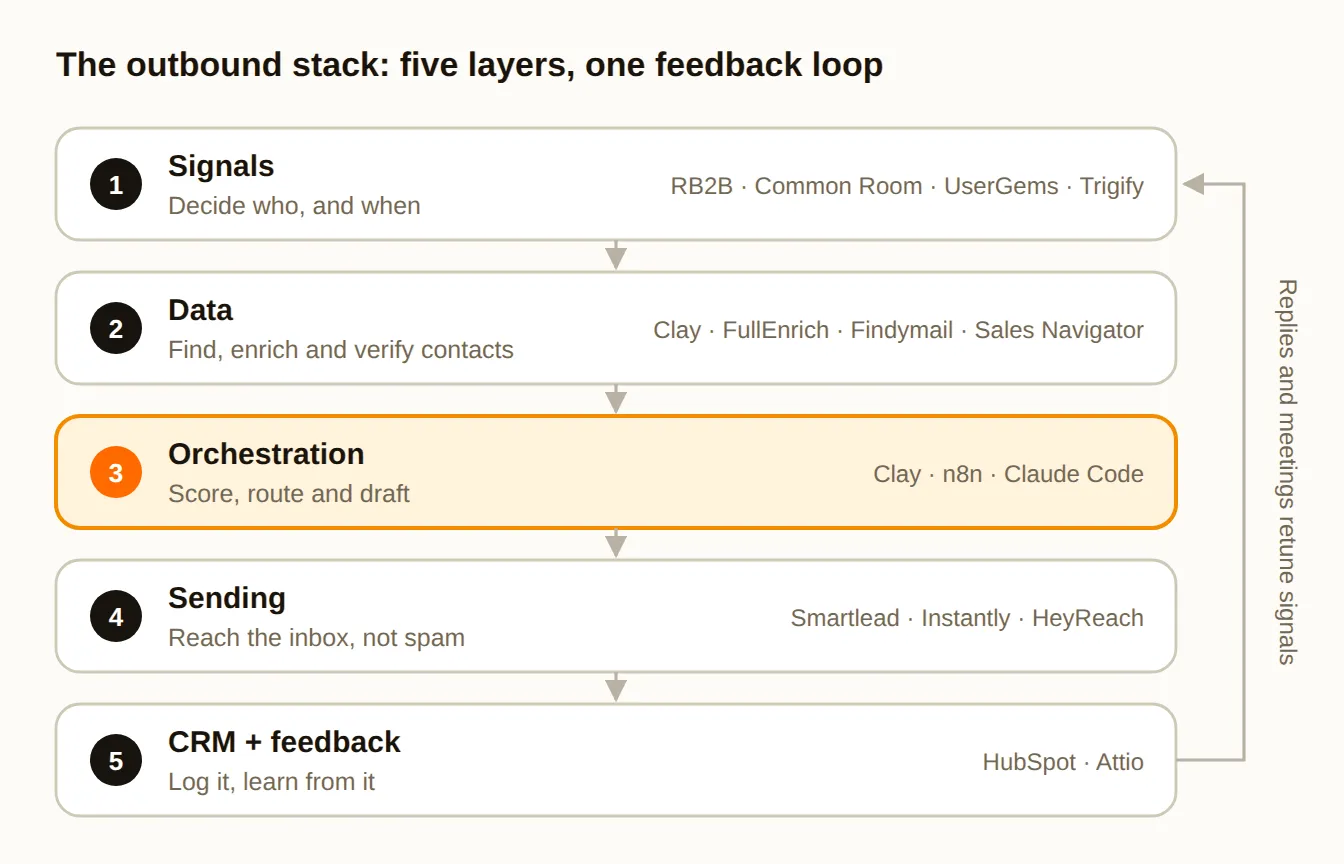
The five jobs every outbound stack has to do
Strip outbound down and there are five jobs:
- Signals: decide who to contact and when.
- Data: find the right people and a verified way to reach them.
- Orchestration: score, route and draft, turning a signal into a ready-to-send message.
- Sending: get that message into the inbox, not the spam folder.
- CRM and feedback: record what happened and use it to improve layer 1.
The order matters. Most teams buy in reverse, starting with a sequencer and a big contact list, then bolting on signals later. Build from the top down instead: when you know why you are contacting someone, every later layer gets easier and cheaper.
Layer 1: Signals decide who, and when
A signal is a dated, observable event that makes an account more likely to buy now. "Fits our ICP" is not a signal; it is a filter. "Their new VP of Sales started three weeks ago" is a signal.
| Signal type | Examples | Typical tools |
|---|---|---|
| First-party | Pricing-page visits, repeat visits, product sign-ups | RB2B, Warmly |
| People | A champion changes jobs, a new leader is hired into the role you sell to | UserGems, Sales Navigator |
| Company | Funding, hiring for a relevant role, a new tool installed | Clay, Common Room |
| Social | Engaging with competitor or category posts | Trigify, Common Room |
Two rules make signals useful instead of noisy:
- Every signal needs a date. A funding round from last week is a reason to reach out. The same round from last year is trivia. Store the date with the signal and decide how long each type stays "fresh".
- Stack signals, don't chase single ones. One pricing-page visit is weak. A pricing-page visit from an account that just hired a RevOps lead is strong. Score combinations, not events.
Layer 2: Data finds the right people and verifies them
Once you know which accounts matter, you need the right people at them and a working way to reach them. No single data provider covers everyone well, which is why the best teams use waterfall enrichment.
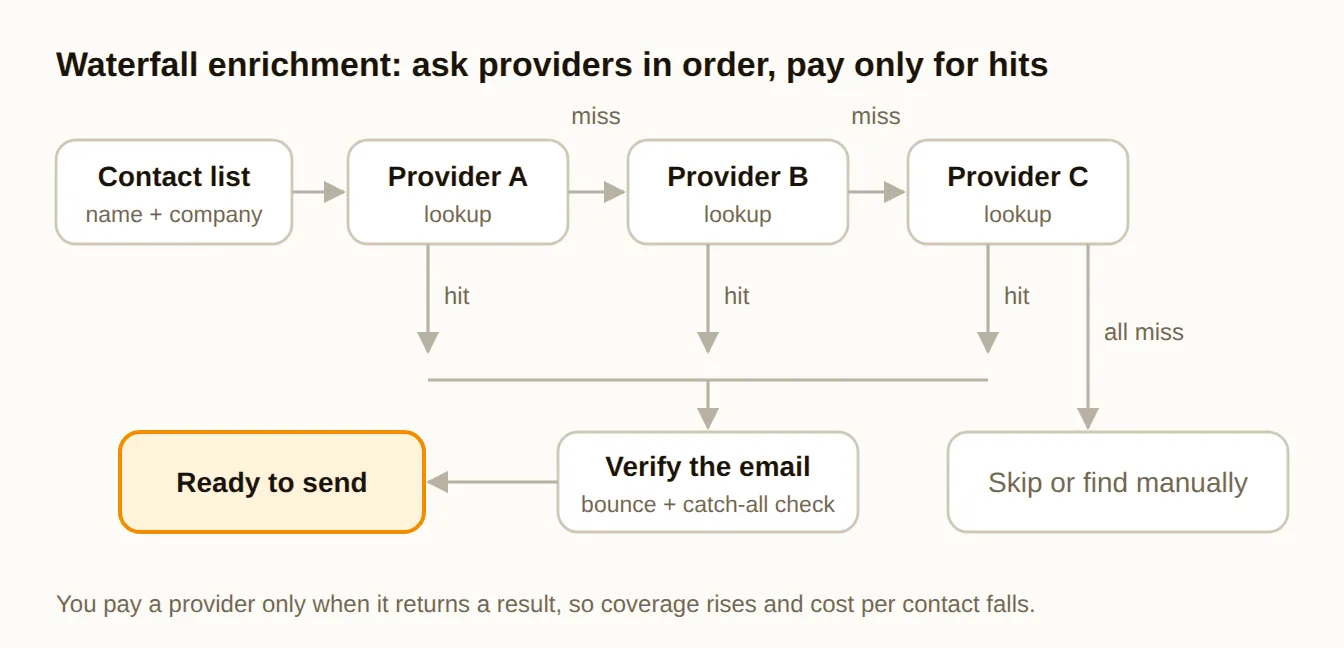
The idea is simple: ask provider A; if it has no result, ask provider B; then C. You pay each provider only when it returns something, so coverage goes up and cost per contact goes down. You can build this yourself in Clay or buy it ready-made from tools like FullEnrich or BetterContact.
Waterfall enrichment + AI research columns in one table
Three habits keep the data layer clean:
- Verify every email before it is sent, whichever provider found it. Treat "catch-all" addresses (domains that accept everything) as risky and send to them sparingly.
- Keep one source of truth. Enrichment results should land in your CRM or one master table, not in five tools that disagree.
- Score fit and timing separately. Fit (industry, size, tech stack) says whether an account could buy. Timing (layer 1) says whether now is the moment. You need both before you send.
Layer 3: Orchestration turns a signal into a message
This is where the stack's logic lives: which signals qualify, how accounts are scored, who owns them and what the first message says. It is also where most of the 2026 change has happened, because AI agents can now research an account and draft a message in seconds.
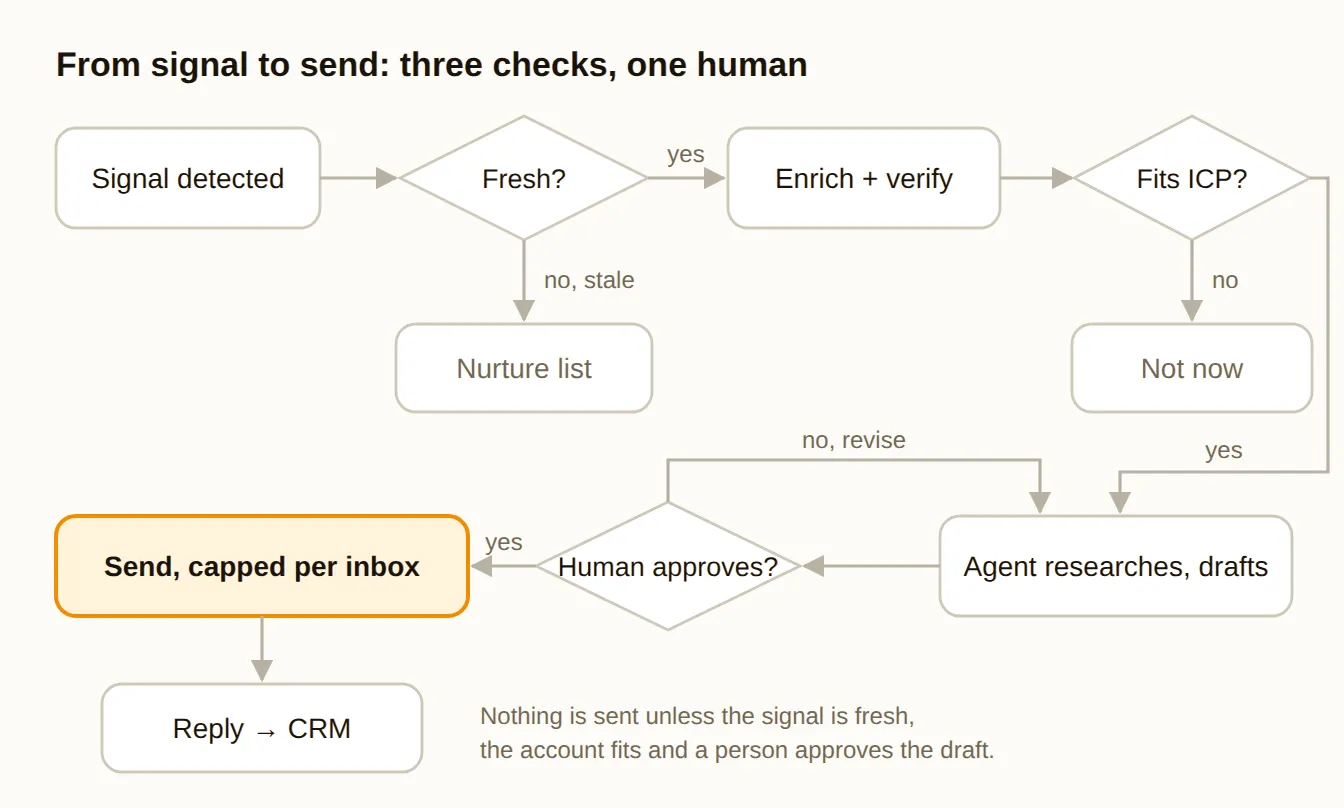
The flow above has three checks before anything is sent:
- Is the signal fresh? If not, the account goes to a nurture list instead of a cold sequence.
- Does the account fit? If not, park it. A great signal from the wrong company is still the wrong company.
- Does a human approve the draft? Agents are good at research and first drafts. They are not yet good at judgement. A rep reviewing ten drafts takes minutes and protects your brand and your domains.
Where should this logic live? It depends on your team:
- Clay is the fastest way to start: tables, enrichment and AI columns in one place, no code.
- n8n suits branching workflows across many tools, with AI agent steps and a self-host option.
- Claude Code or another coding agent suits GTM engineers who want scoring and routing rules in version-controlled code instead of fragile tables.
Whichever you pick, write your ICP definition, scoring rules and messaging guidelines down in plain files the whole team can read. The tool is replaceable; that context is the asset.
Layer 4: Sending protects the domain
You can do everything above perfectly and still fail here. Since February 2024, Google and Yahoo have required bulk senders to authenticate their email (SPF, DKIM and DMARC), keep spam complaint rates low (Google's threshold is 0.3%) and support easy unsubscribes. Microsoft introduced similar rules for high-volume senders in 2025. Cold email that ignores this gets filtered.
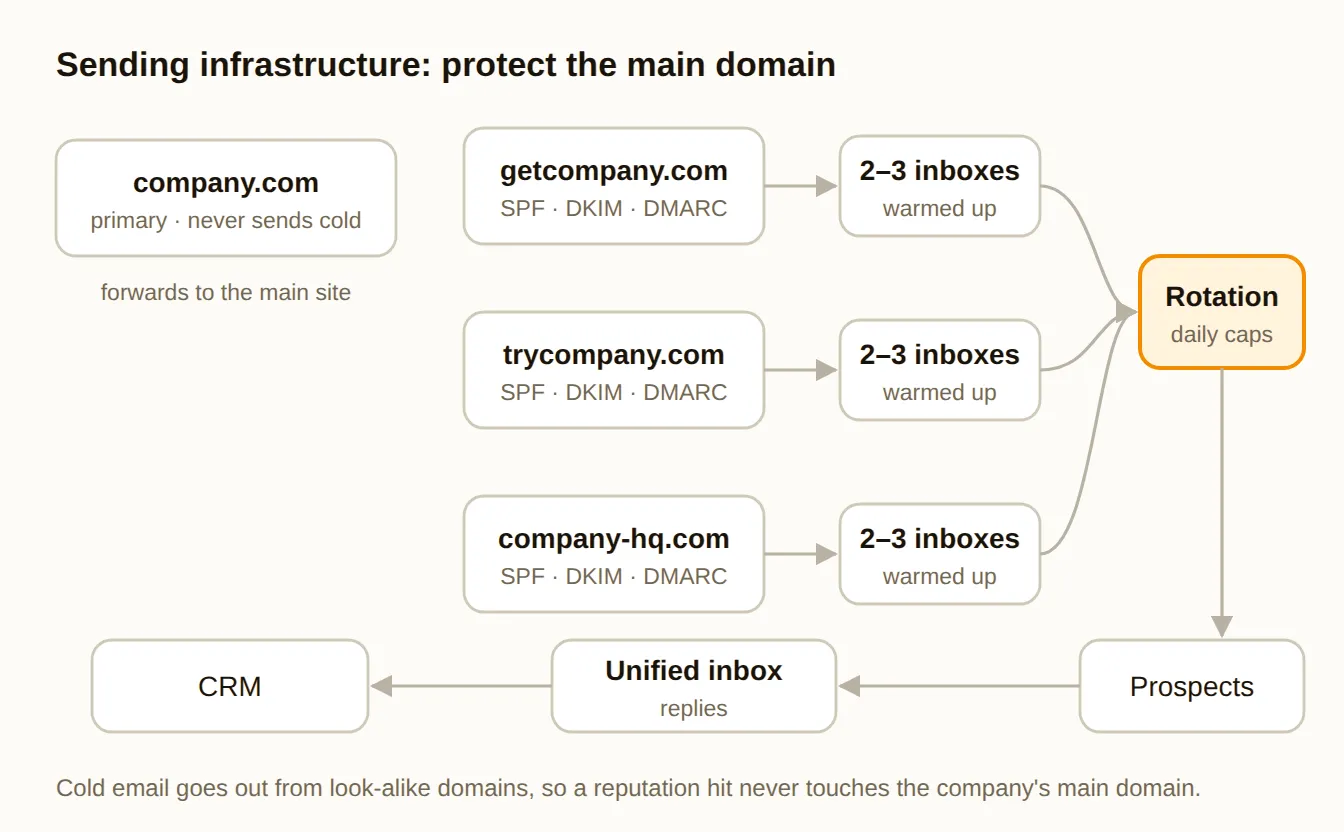
The standard setup looks like this:
- Never send cold email from your main domain. Buy a few look-alike domains (for example getcompany.com) that redirect to your website, and send from those.
- Authenticate every sending domain with SPF, DKIM and DMARC before the first email goes out.
- Use a few inboxes per domain and warm them up for a few weeks before real campaigns, so providers see normal behaviour first.
- Cap daily volume per inbox and rotate across inboxes. Conservative caps protect reputation far better than one inbox sending hundreds a day.
- Write like a person. Plain text, few links, no tracking-heavy templates. Personal emails don't look like newsletters.
Tools like Smartlead and Instantly handle multi-inbox sending, warmup and rotation; MailReach tests where your emails actually land. For a second channel, HeyReach runs LinkedIn outreach across several sender accounts, which pairs well with email for the same accounts.
Layer 5: The CRM closes the loop
The last layer is the one that makes the others smarter. Every reply, meeting and opportunity should flow back into your CRM (for most teams HubSpot or Attio) tagged with the signal that started it.
That one field lets you answer the question that matters: which signals actually turn into pipeline? Review it monthly. Double down on the signals that convert, drop the ones that don't, and feed the answer back into layer 1.
Measure the outcomes that matter, not the easy ones:
- Positive reply rate, not total replies (out-of-office and "remove me" are not wins).
- Meetings held per 1,000 contacts, not meetings booked.
- Pipeline created per signal type, the number that tells you where to invest.
- Bounce and spam-complaint rates, your early warning for layer 4.
Skip open rates. Since Apple's Mail Privacy Protection launched in 2021, opens are inflated and unreliable.
A starting stack for each stage
You don't need every layer fully built on day one. Here is a sensible starting point at each stage, all from the tool directory:
| Stage | Signals | Data | Orchestration | Sending | CRM |
|---|---|---|---|---|---|
| Founder-led | Manual + Sales Navigator | Apollo | Spreadsheet or Clay | Instantly | HubSpot (free) |
| First outbound hires | RB2B, Trigify | Clay + a waterfall tool | Clay | Smartlead + HeyReach | Attio or HubSpot |
| Scaling team | Common Room, UserGems | Clay, Cognism | n8n or code + agents | Smartlead or Outreach | HubSpot or Salesforce |
Start lean, prove which signals convert, then add tools only where a layer is clearly the bottleneck.
Your 30-day rebuild plan
- Week 1: Infrastructure. Buy sending domains, set up SPF, DKIM and DMARC, create inboxes and start warmup. Write your ICP and messaging rules down.
- Week 2: Signals and data. Pick two or three signal types. Set up waterfall enrichment and email verification. Build your first scored list.
- Week 3: Orchestration. Build the signal-to-send flow with its three checks. Let an agent draft, and have a rep approve every message.
- Week 4: Launch and measure. Start with low daily volume, tag every send with its signal, and review replies and meetings at the end of the week.
After a month you will know more about which signals work for you than any vendor benchmark can tell you. That is the point: a stack where every layer has a job, every tool earns its seat, and every meeting traces back to a reason.