
Reps ignore lead scores because the score can't say why a lead matters or whether it still does. Split fit from timing, let engagement points decay, show the reason, and let reps reject leads with a code that improves the model.

In this article 10 sections
- The trust gap is old and well documented
- Timing matters more than points
- Fix 1: split the score in two
- Fix 2: make engagement points decay
- Fix 3: show the reason, not just the number
- Fix 4: let reps reject leads with a reason code
- Fix 5: route in minutes, not days
- A simple model to start with
- The bottom line
- Sources
Ask a sales rep what they think of the lead score and you will usually get a shrug. The number shows up in the CRM, it goes up and down, and nobody on the floor can explain why a lead is a 74 instead of a 41. So reps do what they always did: sort by gut, call the names they recognize, and ignore the column marketing spent a quarter building.
The problem is rarely the math. It is that most scores can't answer the two questions a rep actually asks before picking up the phone: why does this lead matter, and does it still matter today? A score that can't answer those will be ignored, however clever the model behind it.
This is how to build one that answers both.
The trust gap is old and well documented
Sales and marketing have argued about lead quality for as long as there have been leads. In a 2022 survey of 329 B2B professionals, sales' top complaint was marketing targeting the wrong leads (43%), while marketing's top complaint was sales not following up (38%) (MediaPost on the SharpSpring and Ascend2 study).
Both complaints are about the same failure. If the score can't show a rep why a lead deserves a call, the rep won't follow up. And if no one learns why reps skip certain leads, marketing keeps sending the same kind.
Buyers punish the result. In Gartner's survey of 632 B2B buyers, 73% said they actively avoid suppliers who send irrelevant outreach (Gartner). Calling a lead on the strength of a stale score is how you become irrelevant.
Timing matters more than points
The single best argument for building time into your score is an old one. In 2011, Harvard Business Review published an audit of 2,241 US companies' response to web leads. Firms that contacted a lead within an hour were nearly 7 times as likely to qualify it as firms that waited even one hour longer, and more than 60 times as likely as firms that waited 24 hours or more. Among companies that responded within 30 days, the average response time was 42 hours (HBR, The Short Life of Online Sales Leads).
The study is old, and inbound behavior has changed since. But the shape of the finding holds up in every operator's experience: interest decays fast. A score that treats a webinar from eight months ago the same as a pricing-page visit from this morning is measuring history, not intent.
Fix 1: split the score in two
Most scoring models add everything into one number: job title, company size, email opens, page views, webinar attendance. The result hides the thing a rep most needs to know, which is what kind of lead this is.
Split it into two scores:
- Fit answers could this account ever buy? It uses properties that change slowly: industry, size, region, tech stack, the person's role.
- Engagement answers are they buying now? It uses dated events: page visits, replies, demo requests, product sign-ups, and outside signals such as a new leader hired into the role you sell to.
HubSpot's scoring tool now builds these as separate score types: fit scores from property values, engagement scores from events, and combined scores that use both (HubSpot Knowledge Base). Even if you show reps one number, keep both underneath it.
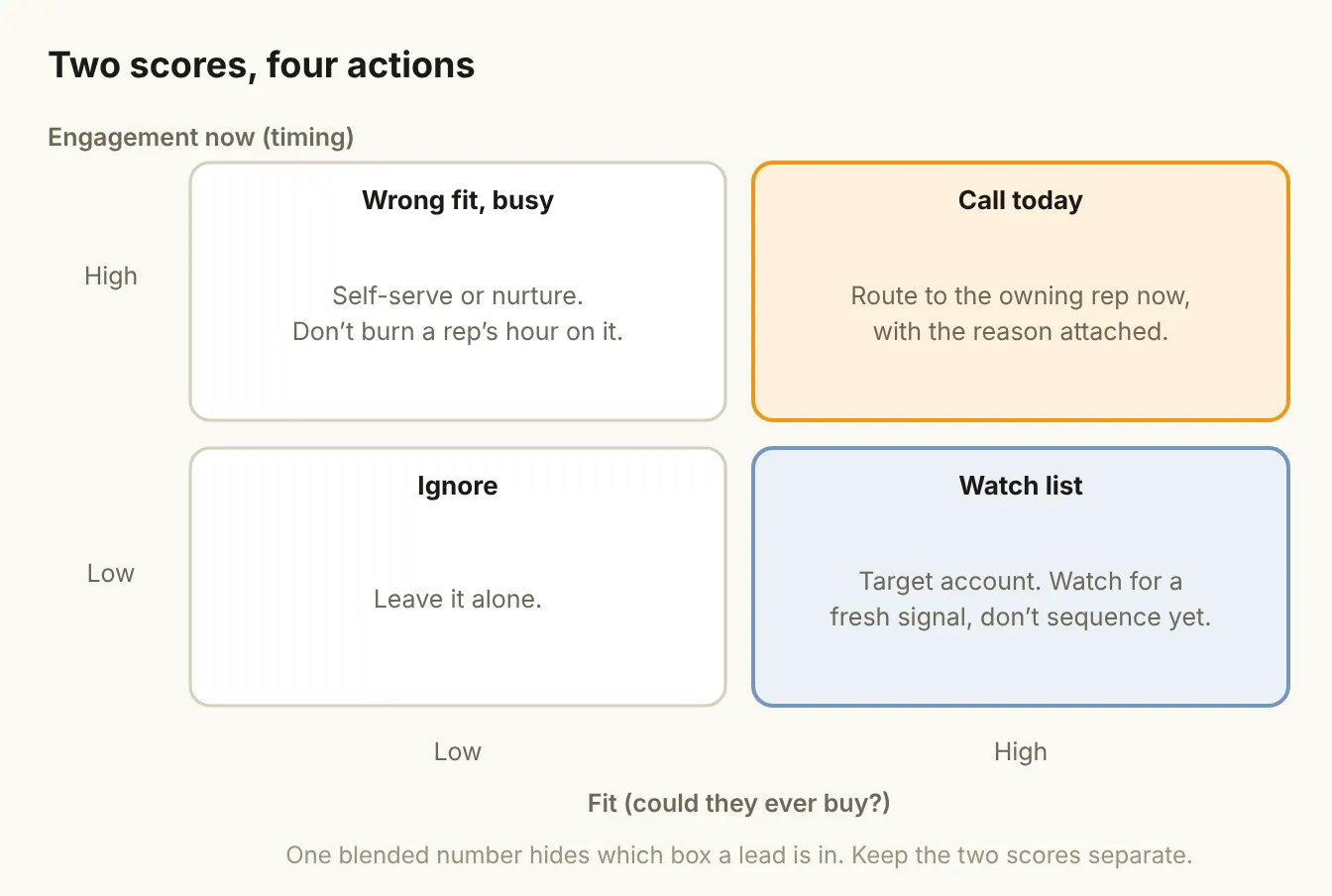
The two scores give you four boxes, and each one gets a different action:
| Fit | Engagement | What it means | Action |
|---|---|---|---|
| High | High | Right account, active now | Route to the owning rep today, with the reason |
| High | Low | Right account, quiet | Watch list: wait for a fresh signal |
| Low | High | Busy, but unlikely to buy | Self-serve, nurture or partner |
| Low | Low | Neither | Leave it alone |
Only the top-left box should interrupt a rep's day. Everything else goes somewhere cheaper.
Fix 2: make engagement points decay
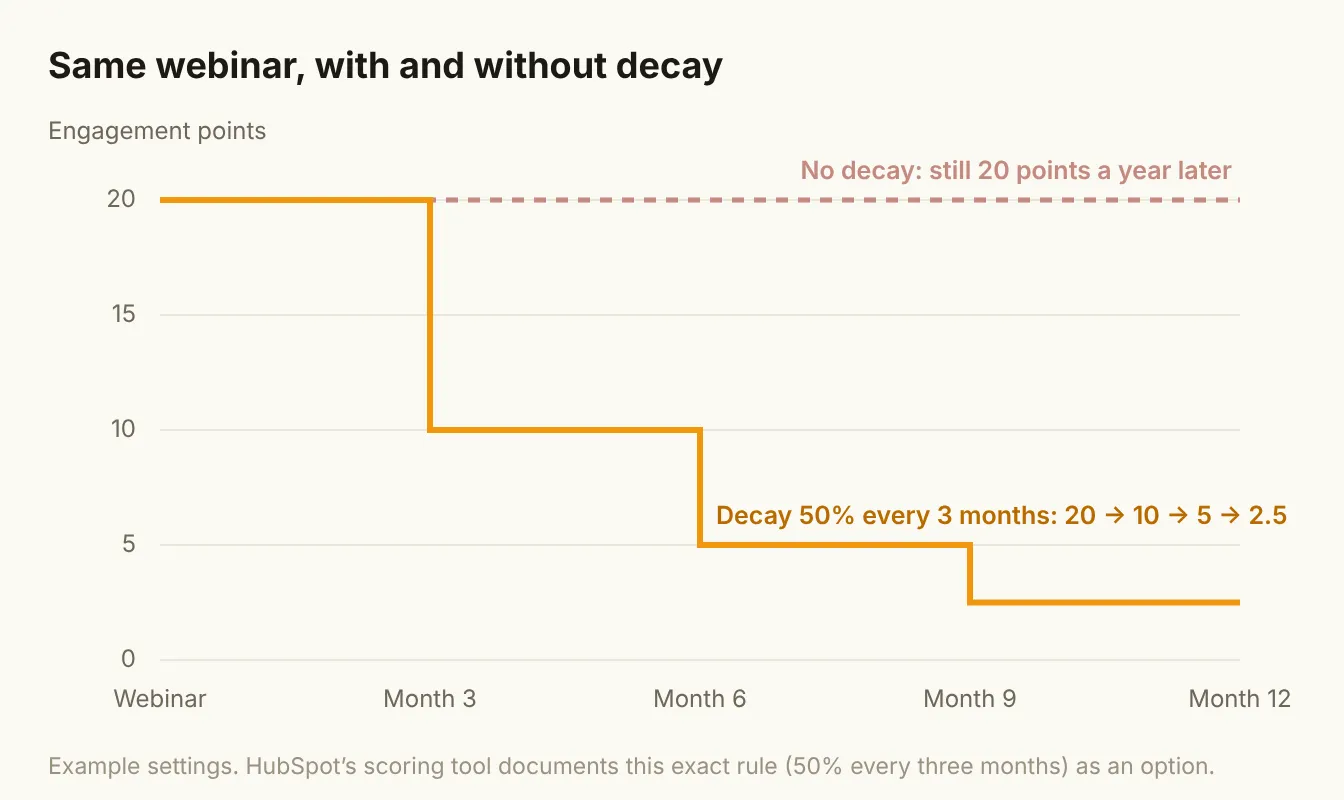
A webinar attended last spring should not count the same as a demo request this week. Score decay solves this by shrinking the points from an event as it ages.
HubSpot documents decay as an option that "automatically reduces a score based on how long ago a scored event occurred," with an example of 50% decay every three months (HubSpot Knowledge Base). You can also limit an engagement rule to events inside a set timeframe.
Three practical rules for setting decay:
- Decay fast for weak signals. Email opens, a single blog visit and social likes should fade within weeks, if you score them at all.
- Decay slowly for strong ones. A demo request or a product sign-up deserves a longer half-life.
- Never decay fit. Industry and company size don't get stale the way intent does. Review them when the account changes, not on a timer.
If your tool doesn't support decay, use timeframes instead: count only events from the last 30 or 90 days.
Fix 3: show the reason, not just the number
"Score: 74" tells a rep nothing. "Visited pricing twice this week, new VP of Sales started last month, fits the mid-market ICP" tells them who to call, why, and what to open with.
Put the top two or three reasons behind every score in a field the rep sees next to the number. If you build scoring in Clay or with an AI step in your workflow, generate the reason as plain text alongside the score. If you build it in your CRM, list the rules that fired.
A reason does three jobs at once:
- It earns trust. A rep can check the reason in five seconds and decide whether they agree.
- It improves the first touch. The reason is the opening line of the call or email.
- It makes bad scores visible. When a reason is obviously wrong ("high engagement: opened 40 emails"), someone notices and fixes the rule.
Fix 4: let reps reject leads with a reason code
The fastest way to improve a score is to let the people who use it say when it is wrong, in a structured way.
Forrester's guidance on MQL handoff lists a short set of reasons sales should be able to reject a lead for: the rep has no capacity, the contact data is incomplete, the lead was misassigned, the data is inaccurate, the lead is already in an active deal, or it doesn't meet the agreed definition (Forrester). Add those as a required picklist when a rep rejects a lead.
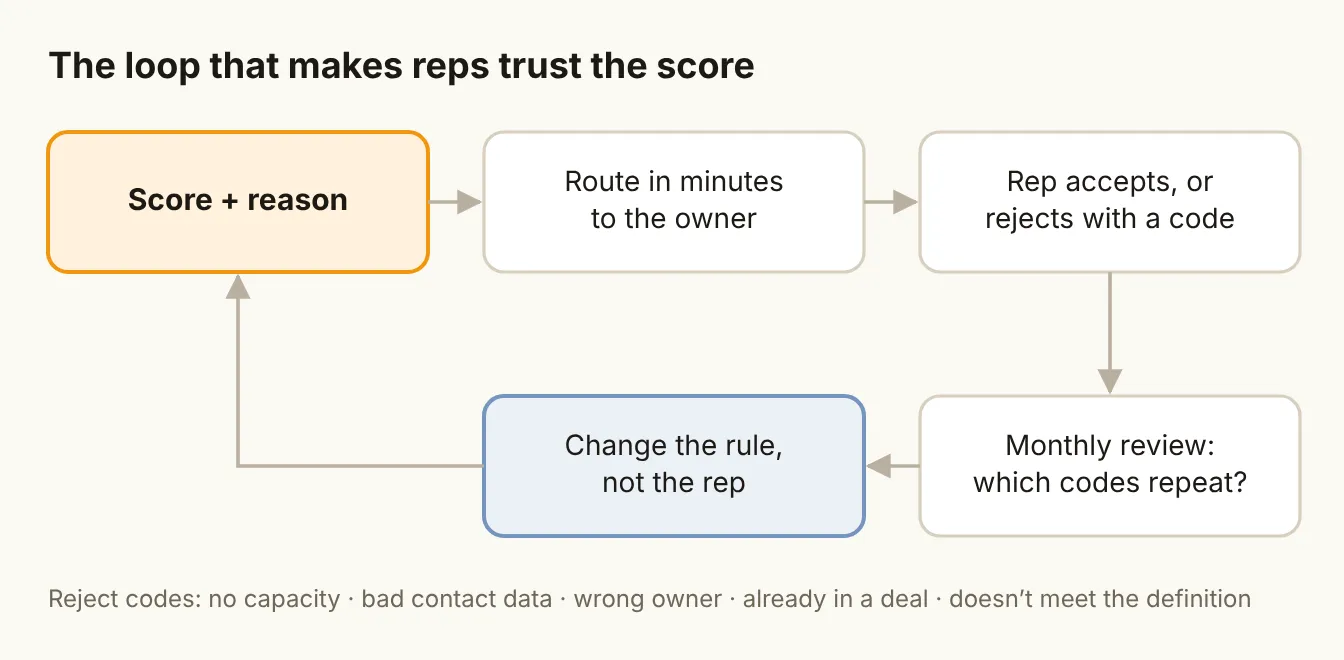
Then review the codes once a month:
- Lots of "doesn't meet definition"? Your fit rules are too loose. Tighten them.
- Lots of "already in a deal"? Your score isn't checking open opportunities. Add that check before routing.
- Lots of "bad contact data"? The problem is enrichment, not scoring. Fix the data layer first.
- Lots of "no capacity"? You have a routing or headcount problem. The score may be fine.
Each answer changes a rule, and each changed rule makes the next month's score more believable.
Fix 5: route in minutes, not days
A perfect score is worthless if the lead sits in a queue. The HBR data above is the reason: the value of a hot lead drops within the hour.
For the top-left box (high fit, high engagement):
- Route instantly to the account owner, or to a round-robin if there isn't one.
- Let the lead book directly when they raise their hand. Tools like Chili Piper put the right rep's calendar on the form, so the meeting is booked before anyone has to follow up.
- Set a response-time target and report on it next to conversion, so the team can see what speed is worth.
A simple model to start with
You don't need machine learning to fix lead scoring. A transparent rules-based model your reps can read beats a black box they ignore. Here is a starting point to adapt:
| Score | Rule | Points | Decay |
|---|---|---|---|
| Fit | Industry and size in ICP | +30 | None |
| Role is a buyer or champion for what you sell | +20 | None | |
| Uses a tool you integrate with or replace | +10 | None | |
| On your disqualifier list | Set fit to 0 | None | |
| Engagement | Demo or contact request | +40 | Slow |
| Pricing page, 2+ visits in 7 days | +20 | Fast | |
| New leader hired into the buying role | +20 | Medium | |
| Webinar or event attended | +10 | Medium | |
| Generic content download | +5 | Fast |
The points are illustrations, not benchmarks. Set your own by looking at the last 50 deals you won and asking which of these were true a month before the first meeting.
The bottom line
Reps don't distrust scores because they dislike data. They distrust them because the number can't explain itself and doesn't know what day it is. Split fit from timing, let engagement fade, show the reason, collect rejections as data, and route fast. Do that, and the score stops being marketing's number and becomes the team's.