
Adding more data providers finds more emails, but it also finds worse ones and costs more per contact. What one practitioner's side-by-side test of four waterfall setups shows, why provider order matters more than provider count, and how to put a verification gate in the right place.

In this article 8 sections
Waterfall enrichment has become the default way to find work emails. Instead of relying on one data provider, you ask several in sequence: if the first can't find an email, try the second, then the third. More providers, more coverage. It sounds like a free win.
It isn't free, and past a point it isn't a win. Every extra provider finds fewer new emails than the one before it, charges for each lookup, and tends to find the contacts that are hardest to reach. The number that tells you whether your waterfall is working is not the find rate. It is the cost per verified email: what you pay, all in, for an address that is safe to send to.
How a waterfall works
The logic is simple. You give the system a contact, usually a name and a company domain. It asks provider A. If A returns an email, the waterfall stops. If not, it asks provider B, and so on down the list.
Clay describes the rule plainly: "Once Clay finds what it needs from one provider, it won't check the others" (Clay University). That is what keeps the cost down. You only pay the second provider for the contacts the first one missed.
It also means order matters. Whoever sits first answers most of your lookups, so their accuracy becomes your accuracy.
What one side-by-side test found
Published, like-for-like comparisons of waterfall setups are rare, because most numbers come from the providers themselves. One practitioner ran the same list of 350 US SaaS prospects at VP and Director level through four setups and published the results (dev.to).
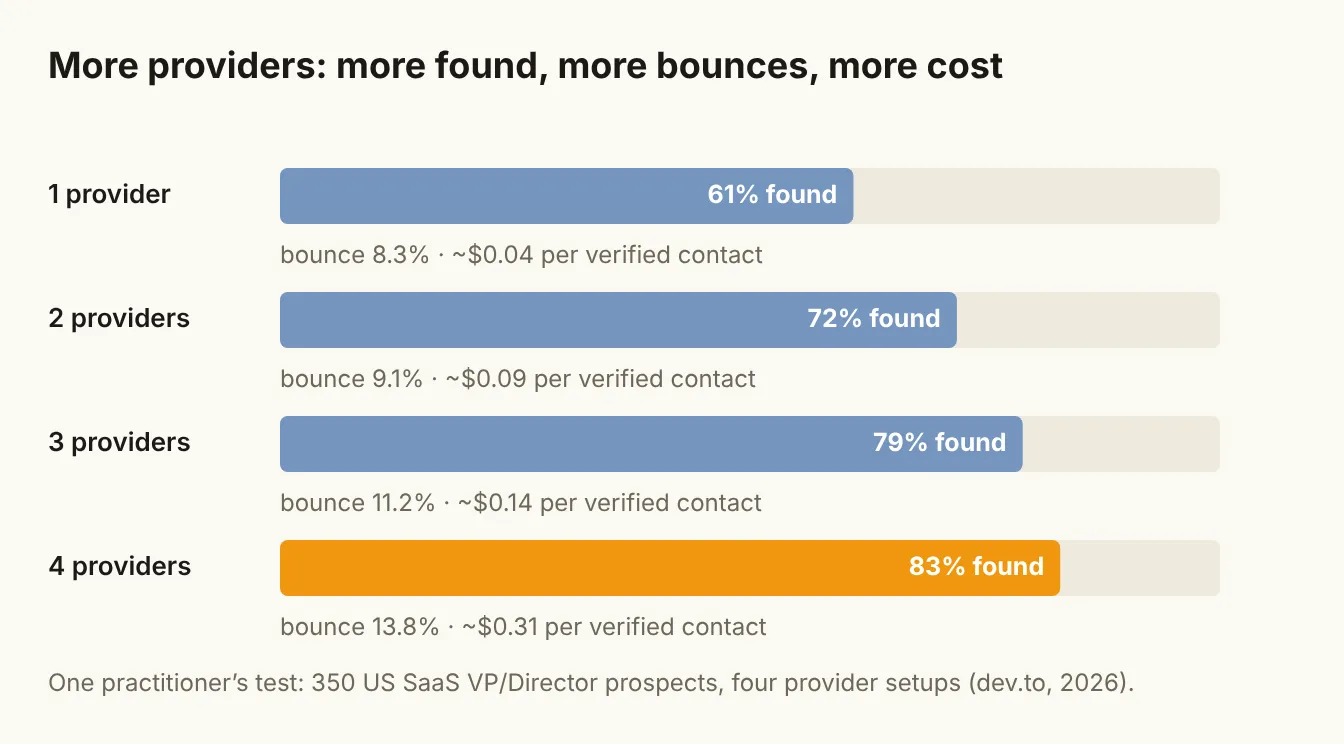
| Setup | Find rate | Bounce rate | Cost per verified contact |
|---|---|---|---|
| 1 provider (Apollo) | 61% | 8.3% | ~$0.04 |
| 2 providers | 72% | 9.1% | ~$0.09 |
| 3 providers | 79% | 11.2% | ~$0.14 |
| 4 providers in Clay, with verification | 83% | 13.8% | ~$0.31 |
This is one test by one person on one kind of list, and the bounce rates come from a small sample of 60 real sends. Treat it as a well-documented example, not a benchmark. But the shape of the results is the useful part, and it matches what most teams see in practice:
- Coverage gains shrink. The second provider added 11 points of find rate. The fourth added 4.
- Cost per contact climbs fast. Going from one provider to four raised the cost per verified contact from about 4 cents to about 31 cents.
- Bounces rise as you go deeper. The author's working theory: "The tail of a waterfall tends to be stale data." Contacts no provider can find easily are often people who changed jobs, records that are out of date or inboxes nobody checks.
Order beats count
The same test included one more run: the three-provider setup with a different provider first. Changing only the order dropped the find rate from 79% to 74%. The author attributes this to the first provider simply having better coverage of the companies on that list, which were US software companies with 50 to 500 employees (dev.to).
Five points from reordering is more than the fourth provider added. That makes provider order, in the author's words, "the single highest-leverage configuration decision."
The practical rules that follow:
- Put your most accurate provider for this segment first, not the cheapest or the best-known. Use price only to break ties.
- Test order by segment. The provider that leads for US software companies may not lead for European mid-market or manufacturing. The same test found waterfalls underperformed for non-SaaS companies, companies under 20 employees and EMEA mid-market lists.
- Write the order down. If you keep a provider-order file for your agents and workflows, as described in The five context files every GTM agent needs, record the date you last tested it and what you measured.
Verify every hit, whoever found it
A found email is not a safe email. Data decays constantly. ZeroBounce's annual list-decay study estimates that at least 23% of an email list goes bad each year, and the figure has run between 22% and 28% every year from 2021 to 2025. In its 2025 data, more than 9% of the addresses it checked were catch-all (ZeroBounce).
A catch-all domain accepts mail for any address, so a verifier can't confirm whether a specific inbox exists. These are the addresses most likely to bounce later, or to land somewhere nobody reads.
So the verification step belongs after the waterfall, applied to every result, whichever provider found it.
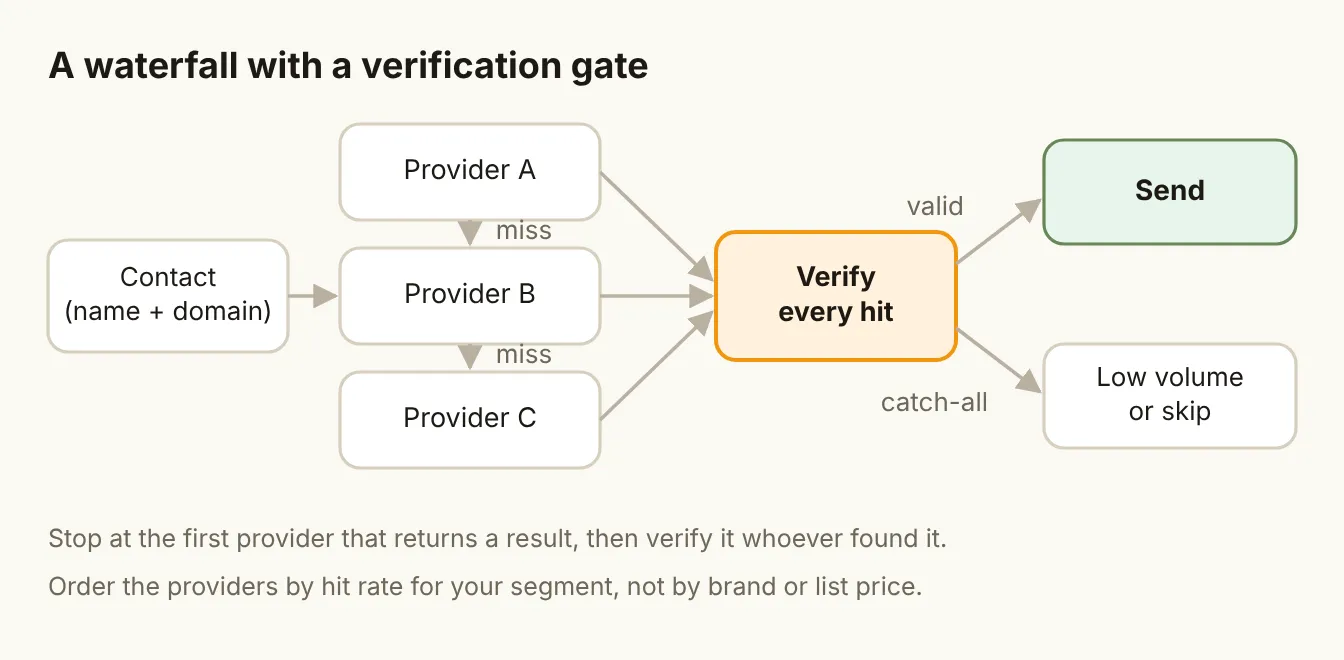
A sensible gate:
- Valid: send.
- Catch-all or risky: don't drop them into your main sequence. Send in small volumes from a separate flow, try another channel, or skip them.
- Invalid: discard, and don't keep paying providers to look them up again.
The practitioner in the test above reports that verifying every result and accepting only "valid" brings their bounce rate from the 12 to 14% range to under 3%. That figure isn't broken out in a table, so treat it as their experience rather than a measured result. But the direction matches basic sender hygiene: inbox providers judge you on bounces, and a waterfall without a gate sends its worst finds straight into your sending reputation.
Some waterfall tools, such as FullEnrich and BetterContact, build verification in and charge only for results that pass it. Others, including single-source finders like Prospeo, Findymail and Wiza, verify their own results. Either way, check what "verified" means for each tool before you trust it, and whether catch-all addresses are counted as found.
How to calculate cost per verified email
Most teams track cost per lookup, because that is what the invoice shows. Cost per verified email tells you more:
Cost per verified email = (all provider charges + verification charges) ÷ number of emails that passed verification
Calculate it for each provider position in your waterfall, not just the total. The useful question is not "what did we spend?" but "what did the third provider cost us for each safe email it added?" If that marginal number is several times higher than the first provider's, and the emails it finds bounce more often, the third provider may not be worth keeping for that segment.
Then compare it with what a contact is worth to you. For a high-value enterprise account, 30 cents per verified email is trivial. For a high-volume, low-price product, it can decide whether the motion is profitable.
A simple test you can run
- Pick 200 contacts from a segment you actually sell to.
- Run them through each provider on its own, not as a waterfall. Record find rate and cost.
- Verify every result. Record how many came back valid, catch-all and invalid, per provider.
- Calculate cost per verified email for each provider.
- Order your waterfall by verified find rate for this segment, with price as the tiebreaker.
- Drop any provider whose marginal cost per verified email is out of line with what the contact is worth.
Repeat it every quarter, or whenever a provider changes pricing. Provider coverage shifts, and the right order last quarter may not be the right order now.
The bottom line
A waterfall finds more emails, but each extra provider finds fewer, costs more and finds worse data. Put your most accurate provider for the segment first, verify every hit before it reaches a sequence, and judge the setup on cost per verified email rather than find rate. Two well-ordered providers and a strict gate usually beat four providers and no gate.