
AI agents and workflows are only as good as the instructions they read. Five plain files (ICP, disqualifiers, provider order, scoring and routing) turn your go-to-market judgment into something every tool can use, and they are the part of your stack a competitor can't buy.

In this article 7 sections
Every GTM team now has access to the same models. The same enrichment providers, the same sequencers, the same agent builders. If your competitor can buy every tool you use, the tools can't be your advantage.
What they can't buy is your judgment: who you sell to, who you never contact, which data source you trust, what makes an account worth a call today, and who should get it. Right now, for most teams, that judgment lives in people's heads, a few old slide decks and the half-remembered settings of a dozen tools.
This article is about writing it down, in five plain files that every agent and workflow reads before it does anything.
Why agents need written context
AI models are capable but literal. They don't know your market, your history or your unwritten rules. They only know what you put in front of them.
Anthropic's engineering team calls this context engineering: "the set of strategies for curating and maintaining the optimal set of tokens" a model sees. Their guiding principle is to find "the smallest possible set of high-signal tokens" that makes the result you want likely. They also warn about "context rot": as a model's context fills up, its ability to recall earlier information gets worse (Anthropic).
For a GTM team, that translates into two practical rules:
- Be specific. Vague instructions ("target modern SaaS companies") produce inconsistent output. Specific ones ("50 to 500 employees, uses HubSpot or Salesforce") produce the same answer every run.
- Be short. Don't paste your entire sales playbook into every prompt. Give the agent the few rules that matter for the job, and let it look up the rest when it needs it.
The same Anthropic article notes that Claude Code drops its project instruction file, CLAUDE.md, into context up front and lets the agent search for other files on demand (Anthropic). The five files below work the same way: small, always loaded, and pointing to more detail when it's needed.
The five files
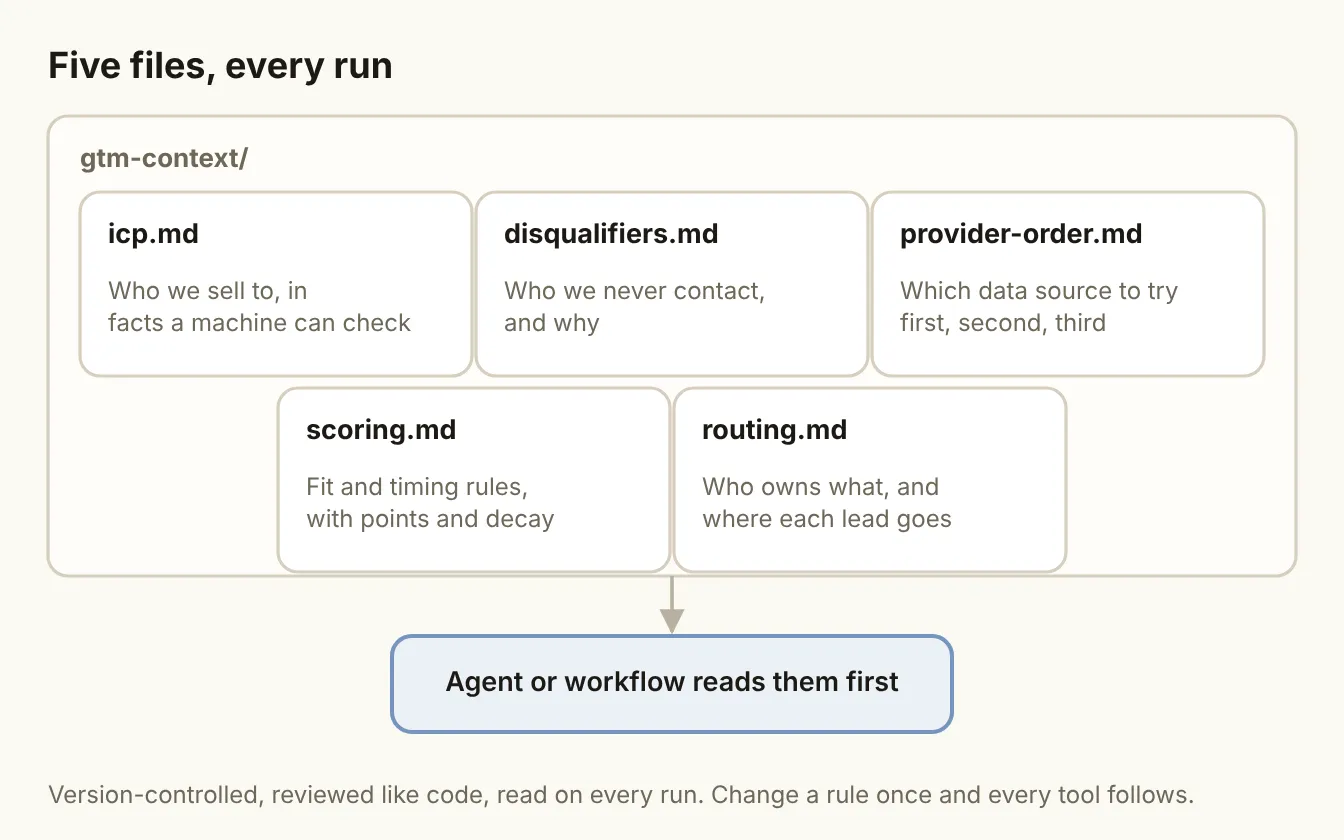
1. icp.md: who we sell to
Your ideal customer profile, written as facts a machine can check. Not "growth-stage companies with a modern sales culture," but industry, employee range, region, tech stack, and the roles you sell to.
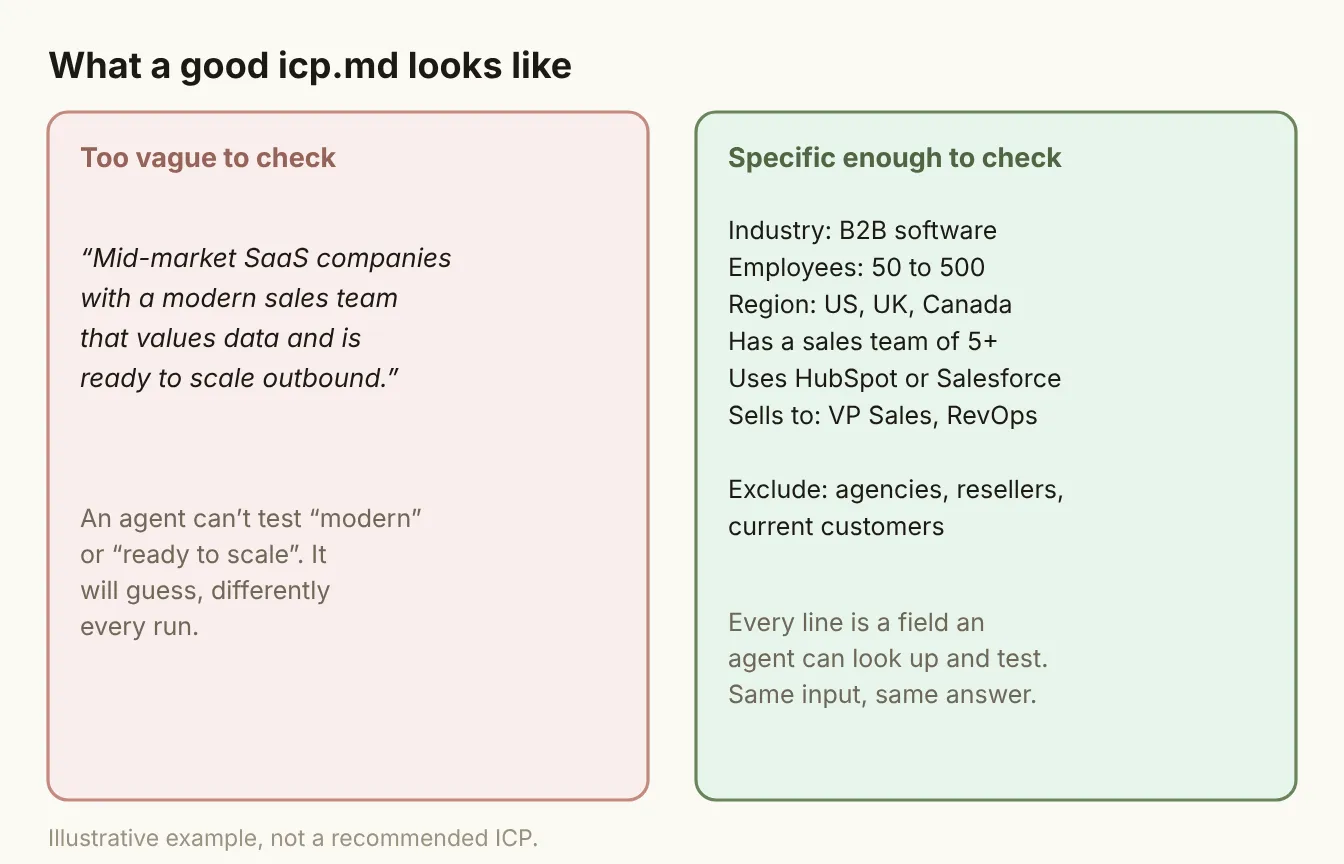
A good test: for every line, could an agent look it up and say yes or no? If not, rewrite it until it can.
Include the why for each criterion in a short note. "Employees: 50 to 500, because below 50 they rarely have a dedicated sales team" helps an agent handle edge cases sensibly, and helps the next person who edits the file.
2. disqualifiers.md: who we never contact
The list most teams forget to write down, and the one that prevents the most embarrassing mistakes. It should include:
- Current customers, and how to check (for example, a CRM field)
- Open opportunities, so an agent never cold-pitches an account a rep is already working
- Competitors and partners
- Industries or regions you can't serve, for legal, compliance or product reasons
- Do-not-contact requests, and where that list lives
Disqualifiers belong in their own file because they are absolute. Scoring weighs things up; disqualifiers stop the process.
3. provider-order.md: which data source to try first
If you use more than one data provider, the order you try them in matters more than which one is "best." This file records that order, by data type and segment:
- Work email: provider A, then B, then C, then verify everything
- Mobile phone: a different order, because coverage differs
- Company data: which source is the source of truth for employee count, industry and funding
Note the date you last tested the order and what you measured. Coverage changes, and an order that was right last year may not be today.
4. scoring.md: what makes an account worth a call
The rules that decide priority. Keep fit (could they ever buy?) and timing (are they buying now?) as separate sections:
- Fit rules: points for ICP criteria, and how many points each is worth
- Timing rules: which signals count, how many points each adds, and how fast they decay
- Thresholds: what score routes to a rep, what goes to nurture, what is ignored
Write the reasoning next to the numbers. A scoring rule nobody can explain is a rule nobody will trust.
5. routing.md: who gets what
Who owns each account, and where each new lead goes:
- Ownership rules: territory, segment, named accounts
- Assignment logic: round-robin, by owner, by product line
- Speed targets: how fast a hot lead must be routed and contacted
- Exceptions: what happens when the owner is out, or when an account has no owner
Why files, and why in version control
You could keep all this in a shared doc. There are three reasons a folder of plain files in a repository works better:
- Every tool can read them. A coding agent like Claude Code, a workflow in n8n, an AI column in Clay: all of them can be pointed at the same text. One source of truth, many readers.
- Changes are reviewed. When someone tightens the ICP or changes a score threshold, the change shows up as a diff with a name and a date. You can see what changed when results changed.
- You can roll back. If a new scoring rule floods reps with bad leads, revert it in one step.
Plain text also outlives tools. You will change your sequencer and probably your enrichment provider. The files move with you.
How to write them in a week
- Day 1: Interview your best rep and your RevOps lead. Ask who they would never call, which accounts close fastest, and what they check before reaching out. Write down their answers as rules.
- Day 2: Pull the last 50 won deals. Check the draft ICP against them. Every criterion should be true for most of them. Remove the ones that aren't.
- Day 3: Write disqualifiers and routing. These are usually the easiest, because they already exist as habits.
- Day 4: Write provider order and scoring. Use whatever data you have on provider hit rates and on which signals preceded won deals.
- Day 5: Test. Give an agent or workflow the five files and a sample of 20 accounts. Check its qualification and routing decisions against what your best rep would do. Fix the files wherever they disagree.
How to keep them alive
Context files rot like everything else. Three habits keep them useful:
- Name an owner for each file. Usually RevOps for scoring and routing, sales leadership for ICP and disqualifiers.
- Review them monthly. Look at what reps rejected and why, and whether the rules explain it.
- Change rules only in the files. If someone changes a score threshold inside a tool without updating the file, the file stops being the truth. Make the file the only place rules change.
The bottom line
The agent is swappable. Next year's model will be better, and you'll switch to it. What carries over is the judgment you wrote down: who you sell to, who you never contact, which data to trust, what makes an account urgent and who owns it. Put that in five short, specific files, read them on every run, and every tool you add gets smarter on day one.