
Most GTM 'agents' should be plain workflows with one AI step. A simple grid for deciding which you need, the five workflow patterns that cover most GTM automation, and the guardrails for when an agent really is the answer.

In this article 9 sections
Every GTM tool now has an "agent" on its pricing page. Research agents, SDR agents, RevOps agents, agents that manage other agents. If you run a revenue team, the pressure is obvious: buy one, build one, or explain to your CEO why you haven't.
Here is the uncomfortable part. Most of the jobs these agents are sold for don't need an agent at all. They need a workflow: a fixed sequence of steps you could draw on a whiteboard, with an AI model doing one or two of those steps. Workflows are cheaper, faster, easier to debug and far less likely to do something embarrassing in front of a buyer.
This article gives you a working definition of each, a simple grid for deciding which one a job needs, and the five workflow patterns that cover most of what GTM teams actually automate.
Workflow vs agent: the one-sentence difference
The clearest definitions come from Anthropic's engineering guide, Building effective agents (Anthropic):
- Workflows are "systems where LLMs and tools are orchestrated through predefined code paths."
- Agents are "systems where LLMs dynamically direct their own processes and tool usage."
Put simply: in a workflow, you decide the steps and the model fills in some of them. In an agent, the model decides the steps as it goes.
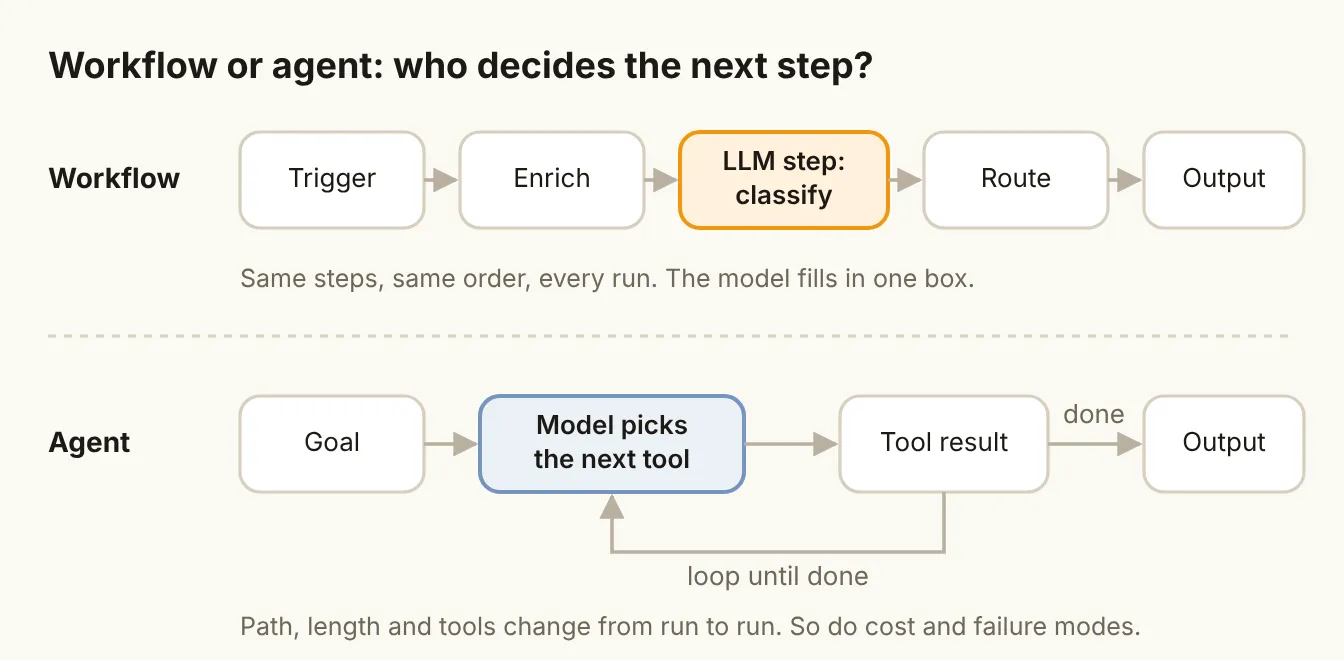
That difference sounds small. In practice it changes everything you care about when something runs unattended:
| Workflow | Agent | |
|---|---|---|
| Who picks the next step | You, in advance | The model, at run time |
| Same input, same steps? | Yes | Not guaranteed |
| Cost per run | Predictable | Varies with how many steps it takes |
| When it breaks | At a known step you can inspect | Somewhere in a chain of its own choices |
| Best for | Jobs you can describe step by step | Jobs where the path depends on what it finds |
Anthropic's own advice is to find "the simplest solution possible, and only increasing complexity when needed." It says workflows "offer predictability and consistency for well-defined tasks," while agents are the better option "when flexibility and model-driven decision-making are needed at scale" (Anthropic). That is the company building the models telling you not to reach for an agent first.
The reality check on agents
The market numbers point the same way.
- Many agent projects won't survive. Gartner predicts over 40% of agentic AI projects will be canceled by the end of 2027, because of escalating costs, unclear business value or inadequate risk controls (Gartner).
- Many "agents" aren't agents. In the same release, Gartner calls out "agent washing", vendors rebranding chatbots, assistants and RPA as agentic, and estimates only about 130 of the thousands of agentic AI vendors are real.
- Sellers aren't feeling it yet. Gartner also predicts that by 2028 AI agents will outnumber human sellers tenfold, yet fewer than 40% of sellers will report that agents improved their productivity (Gartner).
- Pilots rarely reach the P&L. MIT NANDA's GenAI Divide research, based on about 150 interviews, a survey of 350 employees and 300 public deployments, found only about 5% of AI pilots achieve rapid revenue acceleration. More than half of generative AI budgets go to sales and marketing, yet the biggest returns showed up in back-office automation (Fortune).
None of this says agents don't work. It says the bar for "this needs an agent" should be higher than "a vendor called it one."
Why agents struggle on multi-step business work
There is also a technical reason to be careful. Salesforce AI Research built a benchmark of realistic CRM tasks, CRMArena-Pro, and tested leading models on it. The best agents reached about 58% success on single-turn tasks, falling to about 35% when the task needed a multi-turn exchange. The researchers also found "near-zero inherent confidentiality awareness": agents rarely refused to share sensitive data unless explicitly told to (arXiv).
The more steps an agent chains together, the more chances it has to go wrong, and the errors compound. A workflow sidesteps most of that by fixing the steps and giving the model one narrow job at a time.
The workflow-or-agent grid
When a new automation idea comes up, ask two questions:
- Can you write the steps down in advance? If a competent new hire could follow a checklist to do the job, the answer is yes.
- What does a wrong step cost? A mislabeled row in a spreadsheet is cheap. An email to a buyer, a changed deal stage or a pricing promise is not.
Those two questions give you four boxes.
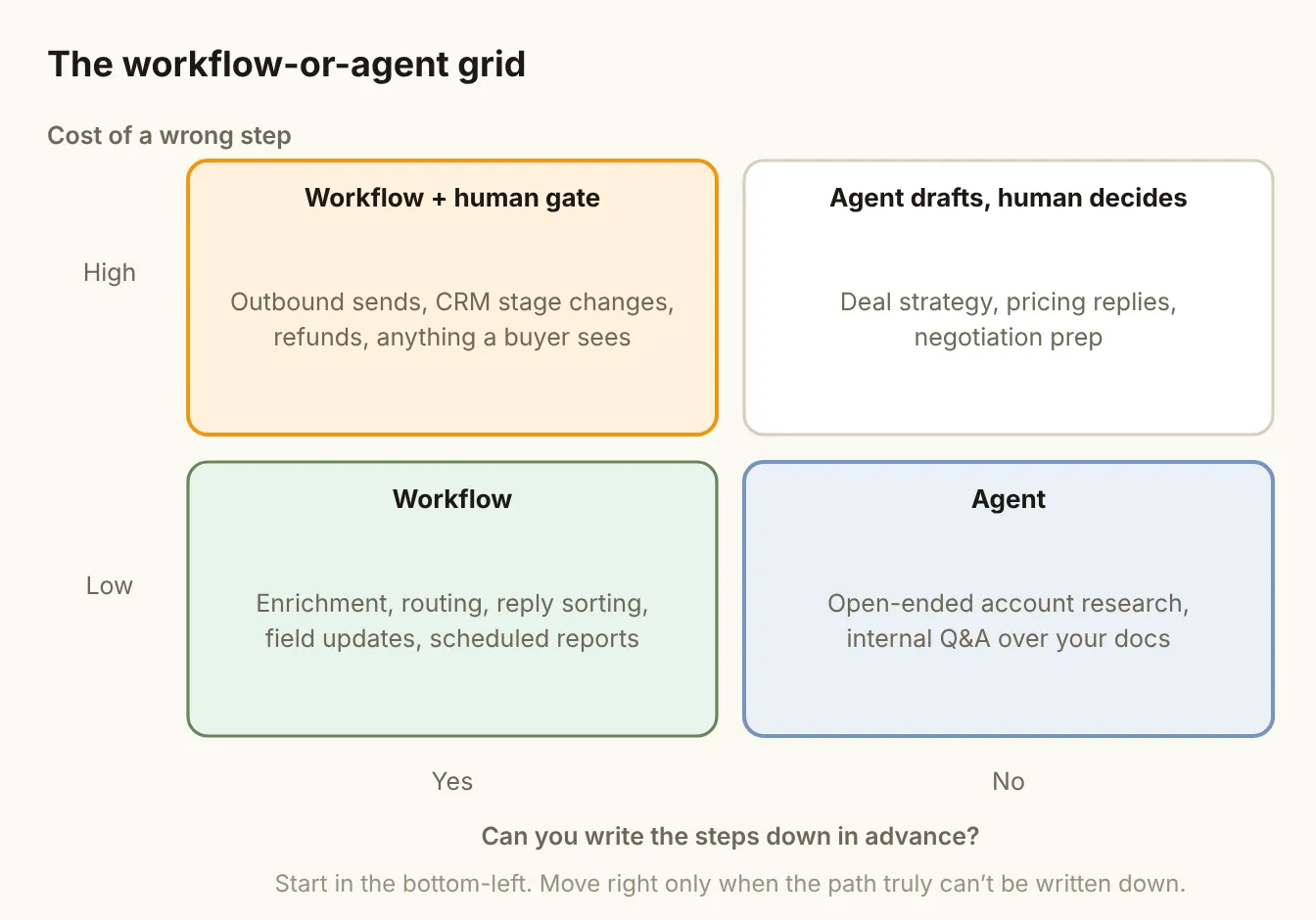
- Workflow (steps known, cheap mistakes). Enrichment, routing, reply sorting, field updates, scheduled reports. Build these as workflows and let a model handle the one fuzzy step, such as classifying a reply.
- Workflow + human gate (steps known, costly mistakes). Anything a buyer sees or that changes your system of record. The steps are still fixed, but a person approves the output before it goes out.
- Agent (steps unknown, cheap mistakes). Open-ended account research, or answering internal questions over your own docs. The path really does depend on what it finds, and a weak answer costs a few minutes of a rep's time.
- Agent drafts, human decides (steps unknown, costly mistakes). Deal strategy, pricing replies, negotiation prep. Let an agent do the legwork and propose; keep the decision with a person.
Start in the bottom-left. Most teams find that the majority of their "agent" backlog is really workflow work.
Common GTM jobs, mapped
Here is how the jobs GTM teams most often want to automate fall on the grid. Treat it as a starting point and adjust for your own risk tolerance.
| Job | Can you write the steps? | Cost of a wrong step | Build it as |
|---|---|---|---|
| Waterfall enrichment | Yes | Low | Workflow |
| Lead routing | Yes | Medium | Workflow |
| Sorting cold email replies | Yes, with one AI classification step | Low if nothing is auto-sent | Workflow (routing pattern) |
| Drafting first-touch outbound | Mostly | High: it reaches buyers | Workflow + human gate |
| CRM updates from call notes | Yes | Medium | Workflow, rep confirms |
| Account research before a call | Partly: depends on what it finds | Low | Agent, or a parallel workflow |
| Answering "what happened with this account?" | No | Low | Agent, read-only |
| Replying to pricing questions | No | High | Agent drafts, human decides |
Notice how few rows end up as a free-running agent. And the ones that do are read-only or reviewed by a person.
Five workflow patterns that cover most GTM automation
The same Anthropic guide describes five workflow patterns. Between them, they cover almost everything on the table above without handing control to the model.
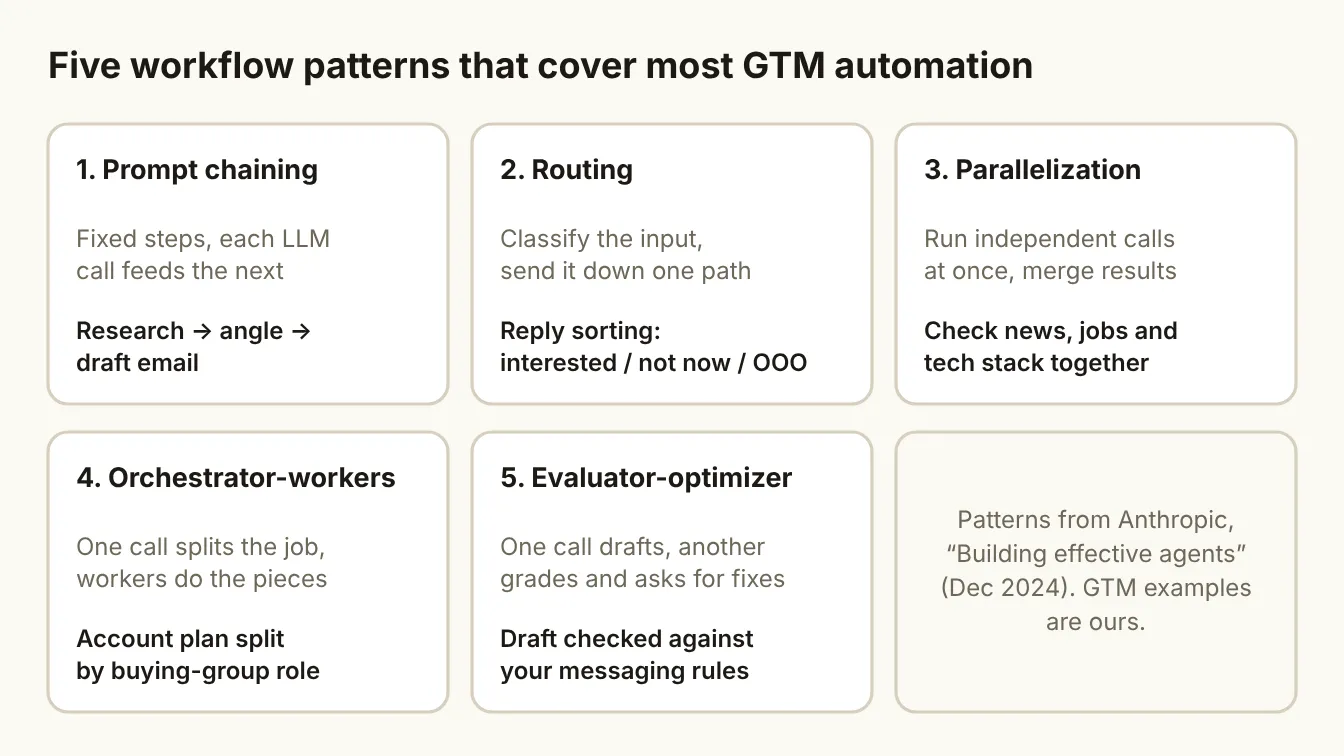
- Prompt chaining. A fixed sequence where each model call feeds the next: research the account, pick an angle, draft the email. Add a simple check between steps, for example "does the draft mention the signal?"
- Routing. Classify the input, then send it down one of several paths. Reply sorting is the classic case: interested, not now, wrong person, out of office, unsubscribe. Each path is a plain workflow.
- Parallelization. Run independent calls at the same time and merge the results. Check news, open jobs and tech stack for an account in parallel, then combine them into one summary.
- Orchestrator-workers. One call breaks the job into pieces and hands each piece to a worker. An account plan split by buying-group role is a good fit, because the number of roles varies by account.
- Evaluator-optimizer. One call drafts, another grades the draft against your rules and asks for fixes. Use it to check outbound copy against your messaging guidelines before a human ever sees it.
Pattern four is the closest to an agent, because the orchestrator decides how to split the work. It is still bounded: the workers do fixed jobs, and you control what the orchestrator is allowed to call.
Where to build each
The tooling question matters less than the pattern, but here is how the common options line up:
- n8n is the natural home for workflows. Every step is visible, and you can drop an AI step into any point of an otherwise fixed flow. It also has agent nodes for the cases that need one.
- Claude Code or another coding agent suits GTM engineers who want the workflow in version-controlled code, with the scoring and routing rules in plain files the whole team can read.
- Relevance AI and Lindy make it easy to stand up agents without code. They are a good fit for the right-hand column of the grid, especially read-only research and internal Q&A.
Whatever you use, put your ICP, disqualifiers and messaging rules in files the automation reads on every run. That context is the part you own. The tool, and the model behind it, will change.
If you do build an agent: five guardrails
Sometimes the path really can't be written down. When you do build an agent, these guardrails keep it in its lane:
- Narrow the goal. "Research this account for a discovery call" beats "help with sales." The narrower the goal, the fewer steps it can wander into.
- Limit the tools. Give it only the tools that job needs. A research agent needs read access, not the ability to send email or edit deals.
- Start read-only. Let it propose changes before it is allowed to make them. Earn write access one action at a time.
- Keep a human at the gate. Anything that reaches a buyer or changes your system of record waits for a person's yes.
- Log every step. You should be able to read back what it did, which tool it called and what it saw. If you can't explain a bad output, you can't fix it.
The bottom line
Before you buy or build an agent, draw the job on a whiteboard. If you can draw it, build a workflow and let the model do one step well. Reserve agents for the jobs where the path depends on what the system discovers, and keep a person in charge of anything that leaves the building.
The teams that get value from AI this year won't have the most agents. They will have the fewest moving parts that still do the job.
Sources
- Anthropic: Building effective agents (Dec 2024)
- Gartner: Over 40% of agentic AI projects will be canceled by end of 2027 (Jun 2025)
- Gartner: By 2028 AI agents will outnumber sellers by 10x (Nov 2025)
- Fortune on the MIT NANDA GenAI Divide report (Aug 2025)
- Salesforce AI Research: CRMArena-Pro (arXiv, May 2025)